
Item frames are a great way to decorate your rooms or display items that you want to show off. All you have to do is place your item frame on any block that you want and place the item you want to display in the frame.
There are many ways to obtain regular visible item frames in Minecraft. You can either spawn them with a command or craft them by collecting materials. However, obtaining invisible item frames is a bit more complicated.
Invisible item frames function like regular item frames, except they remove the frame, allowing players to only see the item being displayed. These types of item frames are impossible to craft and there are only a few ways you can obtain them. In this guide, we will teach you how you can obtain invisible item frames in Minecraft Java and Bedrock Edition.
Java Edition

It is really easy to obtain invisible item frames in Minecraft Java Edition. To do this, you will need to have cheats enabled when you create a new world. After you have enabled cheats and hopped into your world, open up your chat by pressing ‘T’ on your keyboard.
Once you have opened chat, type in this command ‘/give @p minecraft:item_frame[minecraft:entity_data={id=”minecraft:item_frame”,Invisible:1b}]’. You should now have an invisible item frame in your inventory.

Bedrock Edition
Getting invisible item frames in Minecraft Bedrock is a lot more difficult. Unfortunately, Minecraft bedrock players are unable to give themselves invisible item frames with commands because the command to make items invisible doesn’t work. This means that enabling cheats to obtain invisible items wouldn’t work for Bedrock Edition.
The only way you can get invisible item frames in bedrock is by using mods or resource/texture packs.
Downloading Mods/Resource Packs
To get the resource pack that will make your item frames invisible, click this link to download the resource pack.
Step #1: Scroll down to the bottom of the page where it says “Downloads” and download the invisible item frame pack.

Step #2: Go to your downloads in your folder and double-click the resource pack that you have just downloaded.

Step #3: This should then load up your Minecraft Bedrock and start importing the resource pack you just clicked. You will know if the import is finished when a text that says successfully imported appears at the top of the screen.

Step #4: Then, create a new world and go to the tab that says “Resource packs”. If you look at the ‘Owned’ section, you should see that the resource pack is in there.
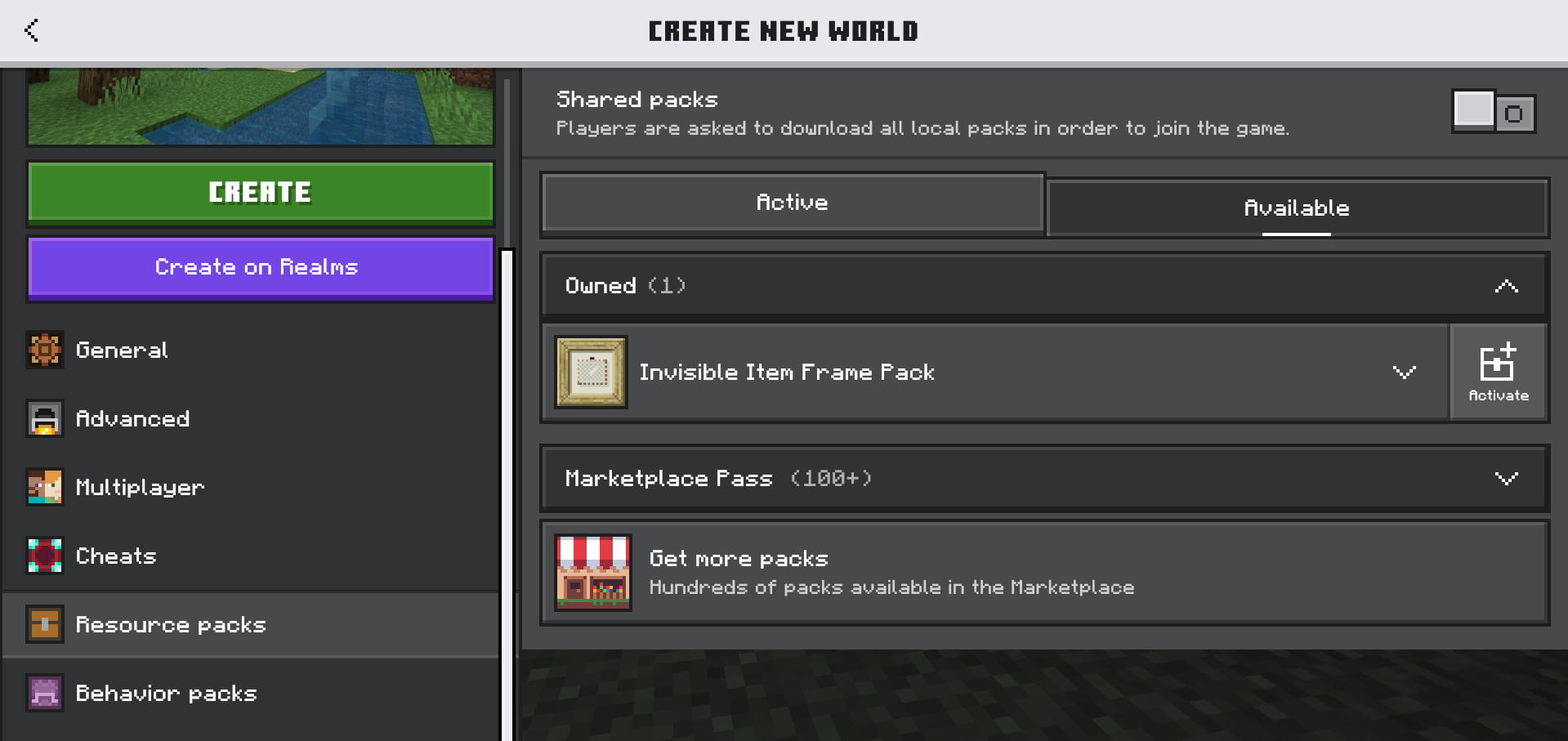
Step #5: Click ‘activate’ to enable the resource pack for your world. It should now say that the resource pack has been activated.

Step #6: Create your world and you should now be able to use invisible item frames in the game. Once you have an item frame, place it on any block that you want and you should see that the item frame is now invisible.

For more help with downloading and using resource packs, check out this YouTube video.
Conclusion
Item frames are great for decorating your house and invisible item frames can make the decoration look even better. If you are still struggling to obtain invisible item frames, check out this YouTube guide.

Alex is a gaming enthusiast with a passion in content creation and social media. In his free time,
he enjoys playing golf, building keyboards, and cooking.
Leave a Reply