• Skip to primary navigation
  • Skip to main content
  • Skip to primary sidebar
NameHero's Gaming Blog

NameHero's Gaming Blog

In-Game Tutorials, Gaming Server Guides, & More!

  • AI Agents
    • OpenClaw
    • Claude Code
    • n8n
    • Hermes Agent
    • Open WebUI
    • Docker
  • Hosting
    • Web Hosting
    • WordPress Hosting
    • WooCommerce Hosting
    • Enterprise Hosting
    • Email Hosting
    • HeroicGuard
    • GPU Hosting
    • Website Builder
  • VPS
    • Managed VPS
    • Unmanaged VPS
    • Flex VPS
  • Reseller
  • Gaming
    • Minecraft Hosting
    • Palworld Hosting
    • Rust Hosting
    • Soulmask Hosting
    • Stardew Valley Hosting
    • Terraria Hosting
    • DayZ Hosting
    • Project Zomboid Hosting
    • Hytale Hosting
  • Domains
  • Account
  • Blog Home
  • Categories
  • Authors

How to Use Phantom Membranes in Minecraft: An Essential Guide

Alex Cam

Published on: May 12, 2025

Categories: Minecraft 0

The Minecon 2017 mob vote saw the phantom come out victorious with the most votes. In the Java 1.13 “Update Aquatic,” Minecraft officially added phantom membranes and phantoms into the game. Bedrock Edition soon followed suit in the game’s 1.14 update.

Most players would agree that the phantom is one of the most annoying mobs in Minecraft, with it only spawning at night and knocking players off of high places. These creatures will haunt you to the bitter end until either the sun rises or the player goes to sleep.

Despite how annoying they are, the items obtained from phantoms are pretty useful in some cases. Phantoms drop phantom membranes, which are very useful materials when it comes to repairing your elytra to help you keep flying. In this guide, we will teach you how you can obtain and use phantom membranes.

Table of Contents
  • How to Find Phantom Membranes
    • Killing Phantoms
    • Cats
    • Commands
  • How to Use Phantom Membranes
    • Fixing Your Elytra
      • Step #1:
      • Step #2:
    • Crafting a Slow Fall Potion
      • Step #1:
      • Step #2:
      • Step #3:
    • Notes

How to Find Phantom Membranes

Killing Phantoms

Phantom membranes are mob drops that you can obtain by killing a phantom. Upon death, a phantom has a chance to drop 0-1 phantom membranes. The Looting enchantment on your weapon will increase the maximum number of membranes dropped by one for each level of enchantment. The maximum number of drops that can be achieved is 4 if you have the Looting III enchantment.

To find and kill phantoms, you will need to not sleep for three Minecraft days. Phantoms will continue spawning each night until you sleep. Hit the phantoms with your weapon when they charge towards you, or use your bow to shoot them until they are dead.

Credits: https://www.youtube.com/watch?v=JWfXOqLr2HQ&t=1s&ab_channel=Shulkercraft

The most efficient way to farm phantom membranes would be to build an afk farm that kills the phantoms without needing you to do anything. Check out this amazing tutorial if you want to build an easy and efficient phantom mob farm.

Cats

A cat that is tamed increases the chance of getting a phantom membrane as a gift by 3.22%.

Commands

You can also use the command ‘/give @p minecraft:phantom_membrane [quantity]’. Replace the @p with your player name and quantity with how many phantom membrane you want.

How to Use Phantom Membranes

Fixing Your Elytra

If you have an elytra that is about to break, phantom membranes are the best way to repair them. Phantom membranes restore 108 points of durability to an elytra every time you combine them. To do this, combine one phantom membrane and your elytra on an anvil. You will also need enchantment levels to repair.

Step #1:

First, craft an anvil. You will need a total of 3 iron blocks and 4 iron ingots for this.

Step #2:

Place the elytra and phantom membrane into the first and second slots of the anvil.

Your elytra should now be repaired and ready to fly! Don’t worry if your elytra has enchantments; repairing it with phantom membranes will preserve them.

Crafting a Slow Fall Potion

Another way to use phantom membranes is to use them to brew slow falling potions. To do this, you will need one phantom membrane and one awkward potion.

Step #1:

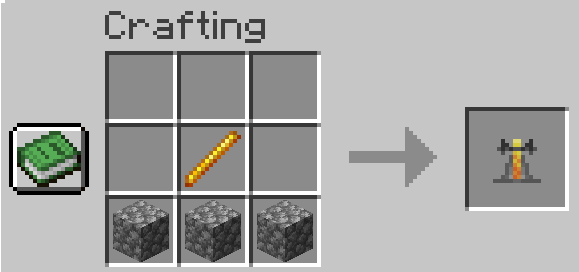
First, you will need to craft a brewing stand. You will need one blaze rod and three cobblestones.
Step #2:

Brew a bottle of water with nether wart until you get an awkward potion.

Step #3:

Brew the awkward potion by putting the phantom membrane into the brewing stand and powering it with a blaze powder.

Now that you have a Slow Falling potion, feel free to drink it and jump off of high places without fear (in game of course)!

Notes

If you want more information on phantoms or phantom membranes, check out this Minecraft guide on YouTube.

Alex Cam

Alex is a gaming enthusiast with a passion in content creation and social media. In his free time,
he enjoys playing golf, building keyboards, and cooking.

Related Posts

Minecraft Copper: The Essential Guide

Discover practical uses for Minecraft copper in tools, armor, and stunning building ideas. Enhance your gameplay with creative tips.

Creative Minecraft Kitchen Ideas For Your Next Build

Discover creative kitchen ideas for your Minecraft builds that blend functionality and style. Get inspired and start crafting.

What is Breach in Minecraft: Everything You Need to Know

Explore the features of Breach in Minecraft and learn how it impacts gameplay. Dive into our comprehensive guide!

How To Get Froglights In Minecraft: A Quick Guide

This guide will cover everything you need to know about froglights, including how to get them, how to change their colors, and what they do.

Reader Interactions

Leave a Reply Cancel reply

Your email address will not be published. Required fields are marked *

This site uses Akismet to reduce spam. Learn how your comment data is processed.

Primary Sidebar

Get Started With a Minecraft Server


Looking to create your own gaming server? It only takes a few minutes.

Create Server Learn More

Most Popular Posts

Minecraft Mace: Everything You Need To Know

Minecraft Path Designs: The Complete Guide

The 5 Most Elegant Minecraft Medieval House Ideas (2026)

Minecraft Copper: The Essential Guide

Minecraft Paintings: Everything You Need To Know

How To Download Optifine

How To Download Minecraft Shaders

How To Cure A Zombie Villager (2026)

What Does The Sniffer Do In Minecraft?

Minecraft Badlands: The Complete Guide

Join Our Gaming Discord!

Come hang out or get support!

Top Categories

  • Palworld
  • Minecraft
  • Soulmask
  • Rust
  • Stardew Valley
  • Terraria
  • Hytale
NameHero

NameHero® proudly provides web hosting to over 40,000 customers with 99.9% uptime to over 750,000 websites.

  • Master Card
  • Visa
  • American Express
  • Discover
  • Paypal
Products
  • Web Hosting
  • Managed VPS Hosting
  • Unmanaged VPS Hosting
  • Flex VPS Hosting
  • WordPress Hosting
  • WooCommerce Hosting
  • Reseller Hosting
  • Enterprise Hosting
  • GPU Hosting
  • Email Hosting
  • HeroicGuard
  • Domains
  • Website Builder
  • AI Agent Hosting
Gaming Products
  • Game Hosting
  • Minecraft Hosting
  • Palworld Hosting
  • Rust Hosting
  • Soulmask Hosting
  • Stardew Valley Hosting
  • Terraria Hosting
  • DayZ Hosting
  • Project Zomboid Hosting
  • Hytale Hosting
Help & Support
  • NameHero Blog
  • NameHero Gaming Blog
  • Support
  • Help Center
  • Migrations
  • Affiliates
  • Gaming Affiliates
  • Call 1-855-984-6263
Company
  • About Us
  • Contact Sales
  • Reviews
  • Uptime
  • We're Hiring

Copyright © 2026 Name Hero, LLC. All rights reserved.
NameHero® is a registered trademark.

  • Privacy Policy
  • Terms of Use
  • Acceptable Use Policy
  • Payment Policy
  • DMCA