• Skip to primary navigation
  • Skip to main content
  • Skip to primary sidebar
NameHero's Gaming Blog

NameHero's Gaming Blog

In-Game Tutorials, Gaming Server Guides, & More!

  • AI Agents
    • OpenClaw
    • Claude Code
    • n8n
    • Hermes Agent
    • Open WebUI
    • Docker
  • Hosting
    • Web Hosting
    • WordPress Hosting
    • WooCommerce Hosting
    • Enterprise Hosting
    • Email Hosting
    • HeroicGuard
    • GPU Hosting
    • Website Builder
  • VPS
    • Managed VPS
    • Unmanaged VPS
    • Flex VPS
  • Reseller
  • Gaming
    • Minecraft Hosting
    • Palworld Hosting
    • Rust Hosting
    • Soulmask Hosting
    • Stardew Valley Hosting
    • Terraria Hosting
    • DayZ Hosting
    • Project Zomboid Hosting
    • Hytale Hosting
  • Domains
  • Account
  • Blog Home
  • Categories
  • Authors

How To Change Your Minecraft Username: A Quick Guide

Max Moeller

Published on: May 1, 2025

Categories: Minecraft 2

Online representation is a vital part of any gaming experience. Your username means everything — it’s the first impression you give to other players, no matter the video game.

It’s only natural, then, that you may want to change your Minecraft username. After all, Minecraft is a pretty old game. If you’ve been playing the game since you were a kid, it’s possible you have a username you’re less than proud of.

If you’re looking to change your Minecraft username, we’ve got you covered. This guide will cover everything you need to know about Minecraft usernames, including how to adjust them based on which version you play, as well as how many times you’re allowed to change it.

Table of Contents
  • Prefer To Watch Instead Of Read? Check Out Our New Video!
  • How To Change Minecraft Usernames
    • Minecraft: Bedrock Edition Gamertag
    • Minecraft: Java Edition Profile Name
    • Minecraft for Nintendo Switch
  • How To Change Your Minecraft Username On Bedrock
    • 1. Navigate to the Official Xbox Website
    • 2. Sign-in With Your Microsoft Account
    • 3. Go to Xbox Settings
    • 4. Click Change Gamertag
    • 5. Input a New Gamertag
    • 6. Change Your Gamertag
  • How To Change Your Minecraft Username On Java Edition
    • 1. Head To The Official Minecraft Website
    • 2. Log Into Your Account
    • 3. Select Change Profile Name
    • 4. Input A New Username
  • How To Change Your Minecraft Username On Nintendo Switch
    • 1. Log Into Your Switch
    • 2. Navigate To Your Profile Page
    • 3. Select The Pencil Icon
    • 4. Change Your Username

Updated 9/26/2025

Prefer To Watch Instead Of Read? Check Out Our New Video!

How To Change Minecraft Usernames

What’s important to understand here is that changing a Minecraft username is a bit more confusing than it may sound.

According to the official Minecraft website, there are multiple Minecraft usernames, depending on the platform you play on. Let’s break down each one.

Minecraft: Bedrock Edition Gamertag

Minecraft: Bedrock Edition is a multi-platform option that supports PC, Xbox, PlayStation, Mobile, and Nintendo Switch, amongst a few other platforms.
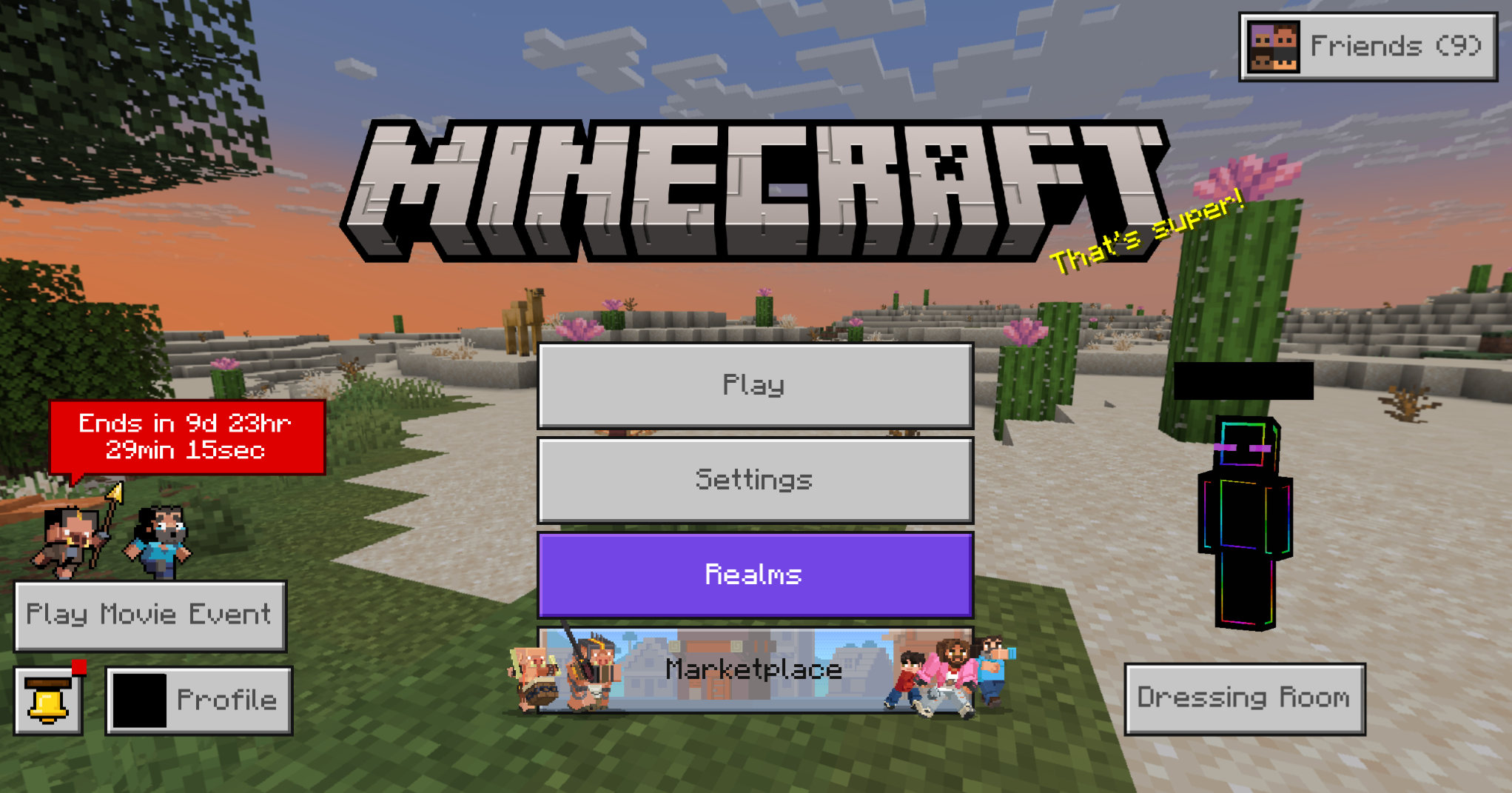
Bedrock Edition shows your username on the main screen. Believe it or not, this is separate from your Microsoft account.

This is the Minecraft that allows you to play multiplayer with friends across platforms and one that requires you to have an Xbox account/Xbox Gamertag.

Minecraft: Java Edition Profile Name

Minecraft: Java Edition doesn’t require an Xbox account, instead allowing you to play with what’s called a Profile Name. Your Profile Name is what shows up when you play single-player in Java Edition, or when you join servers online while playing on Windows, Mac, or Linux computers.
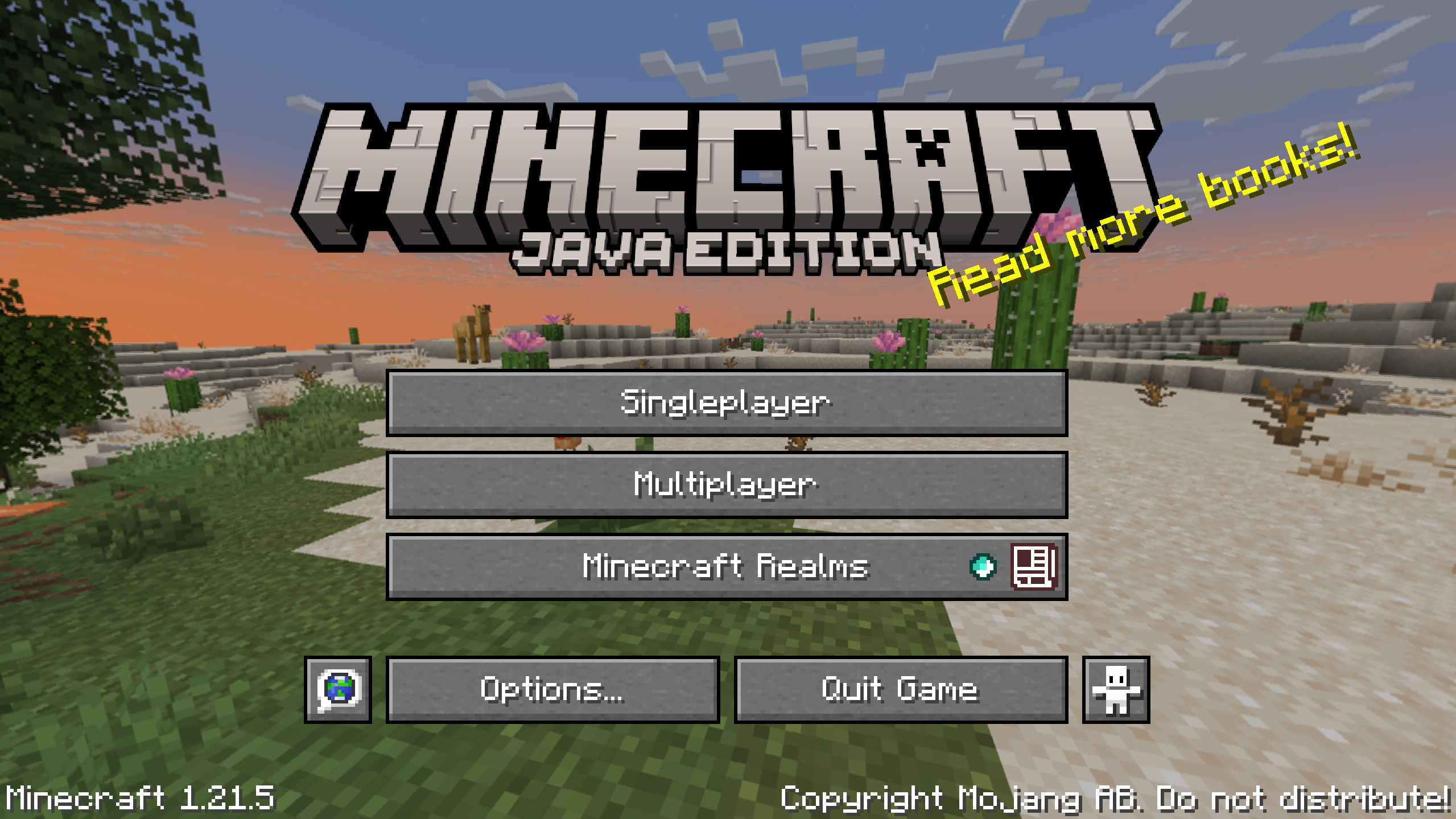
Java Edition does not use your Microsoft account. Instead, you play Minecraft Java with a unique username.

While you can have your Java Profile Name be the same as your Xbox Gamertag, this isn’t required.

Minecraft for Nintendo Switch

Interestingly enough, Minecraft for Nintendo Switch is ostensibly Minecraft: Bedrock Edition, but the game doesn’t necessarily use your Xbox Gamertag.
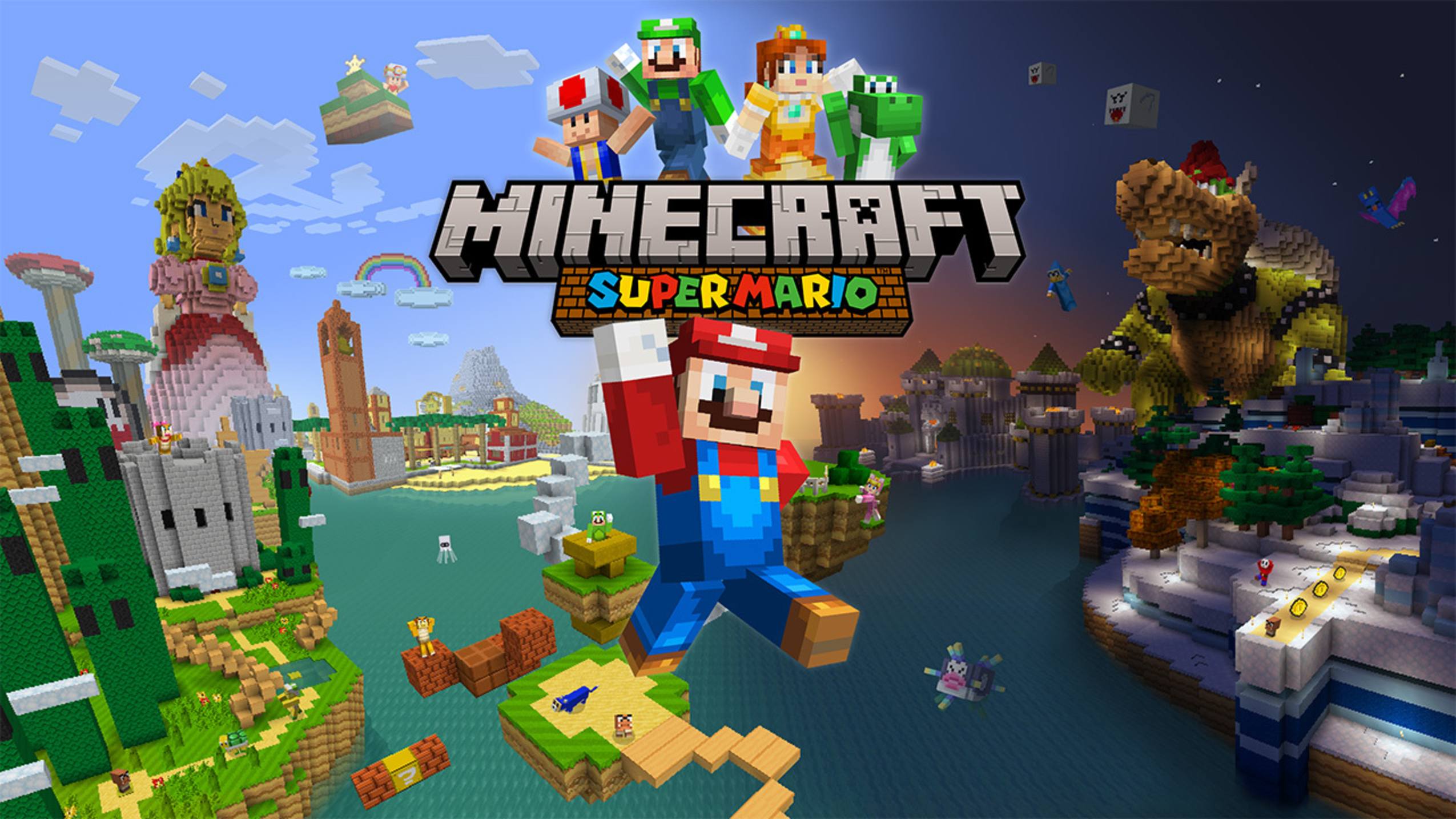
Minecraft on Nintendo Switch has unique collaborations, such as one with Mario. Source: Nintendo

Instead, the Nintendo Switch version utilizes your Switch nickname.

With all of this in mind, let’s break down how to change each type of Minecraft username, detailing the steps for the two major versions of the game.

How To Change Your Minecraft Username On Bedrock

This section will detail how to change your Minecraft username on Bedrock.

1. Navigate to the Official Xbox Website

Instead of the official Minecraft website, you must actually head to the Xbox website to change your Bedrock Edition username. This is because Bedrock requires a Microsoft account, which in turn provides you with a Gamertag.
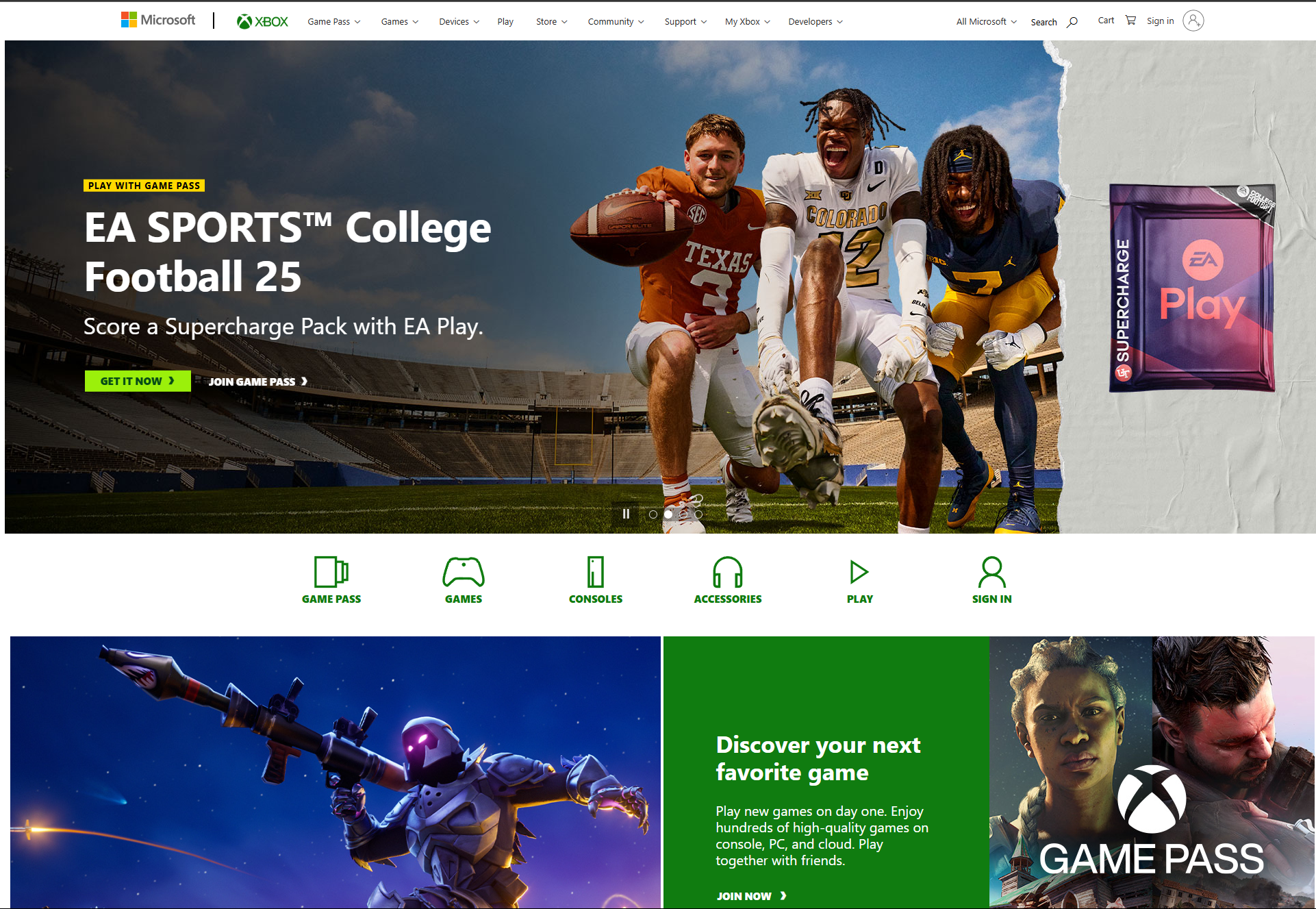
If you're playing Bedrock, this is the way to change to a different username.

2. Sign-in With Your Microsoft Account

Sign into your Microsoft account by clicking one of the two Sign-in buttons on the Xbox homepage.
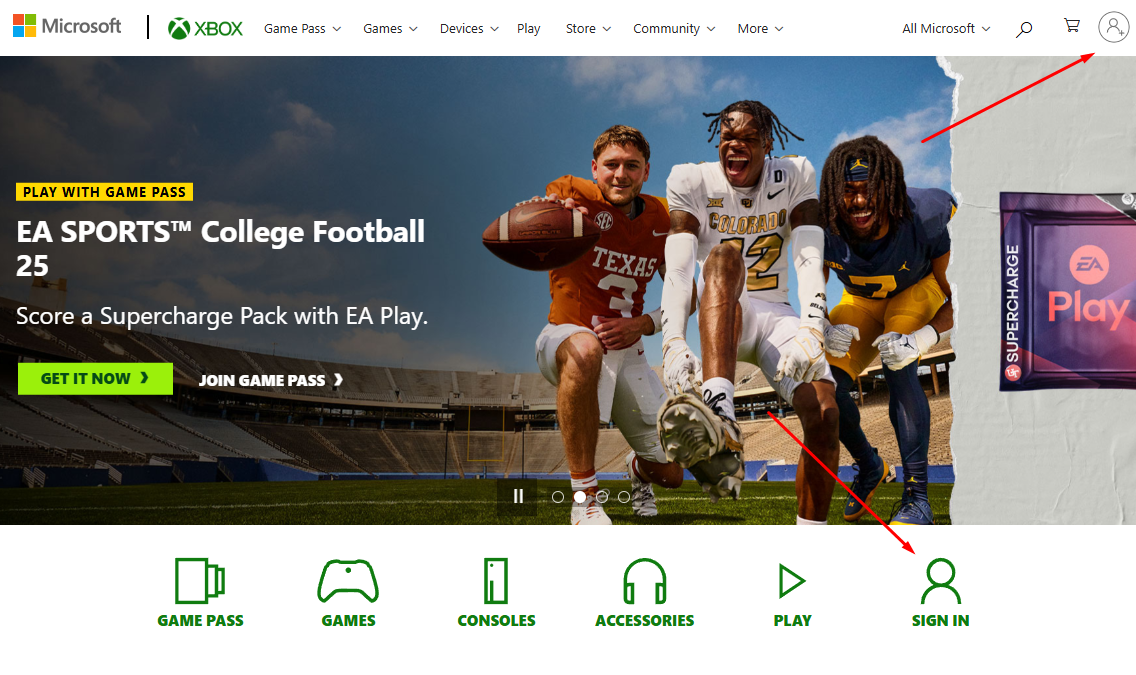
You change your current username without needing to open Minecraft.

3. Go to Xbox Settings

Once you’re signed in, click on your player icon on the top right-hand side of the window, click on the …button, and click on the Xbox Settings button.
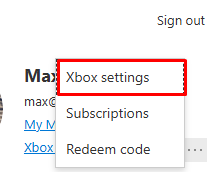
Your Xbox settings will affect all Bedrock platforms, including PlayStation Network or your Android device.

4. Click Change Gamertag

Click on the Change Gamertag button on the page’s left-hand side.
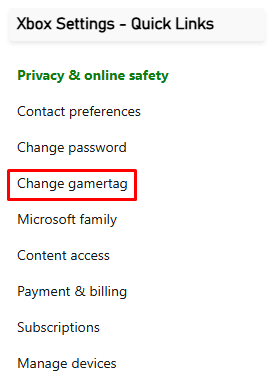
Visit this screen to change your Gamertag.

5. Input a New Gamertag

Type your desired new Gamertag (new username) in the box.Then, click Check availability.
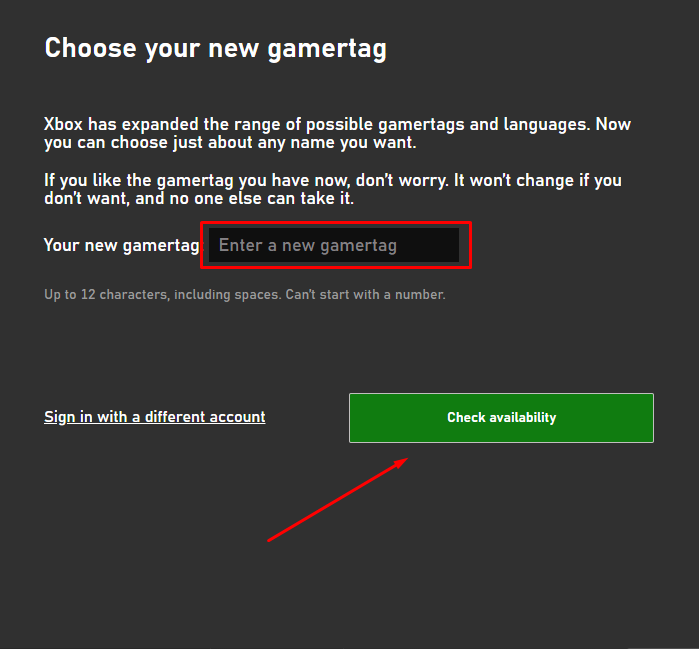
Enter a new online identity here. Just know that your old name will become available to everyone.

6. Change Your Gamertag

If the name you chose is available, this page will appear, telling you what your new Gamertag will look like.

It will also let you know that your old username will be available for someone else to take.
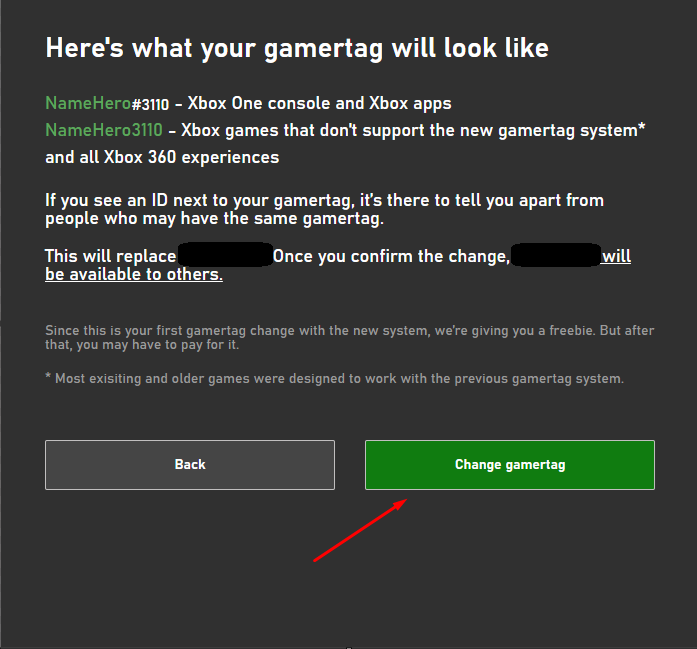
Most Minecraft Bedrock players will be happy with the one free Gamertag change.

If this is your first time changing your Gamertag, you are able to do it for free. However, you must pay for name changes after that.

If you’re happy with the outcome, click on Change Gamertag. Your new Gamertag should appear shortly afterward.

How To Change Your Minecraft Username On Java Edition

Those who play Minecraft Java Edition must go through a different process to change their Minecraft username.

1. Head To The Official Minecraft Website

To start, head to the official Minecraft website, Minecraft.net.
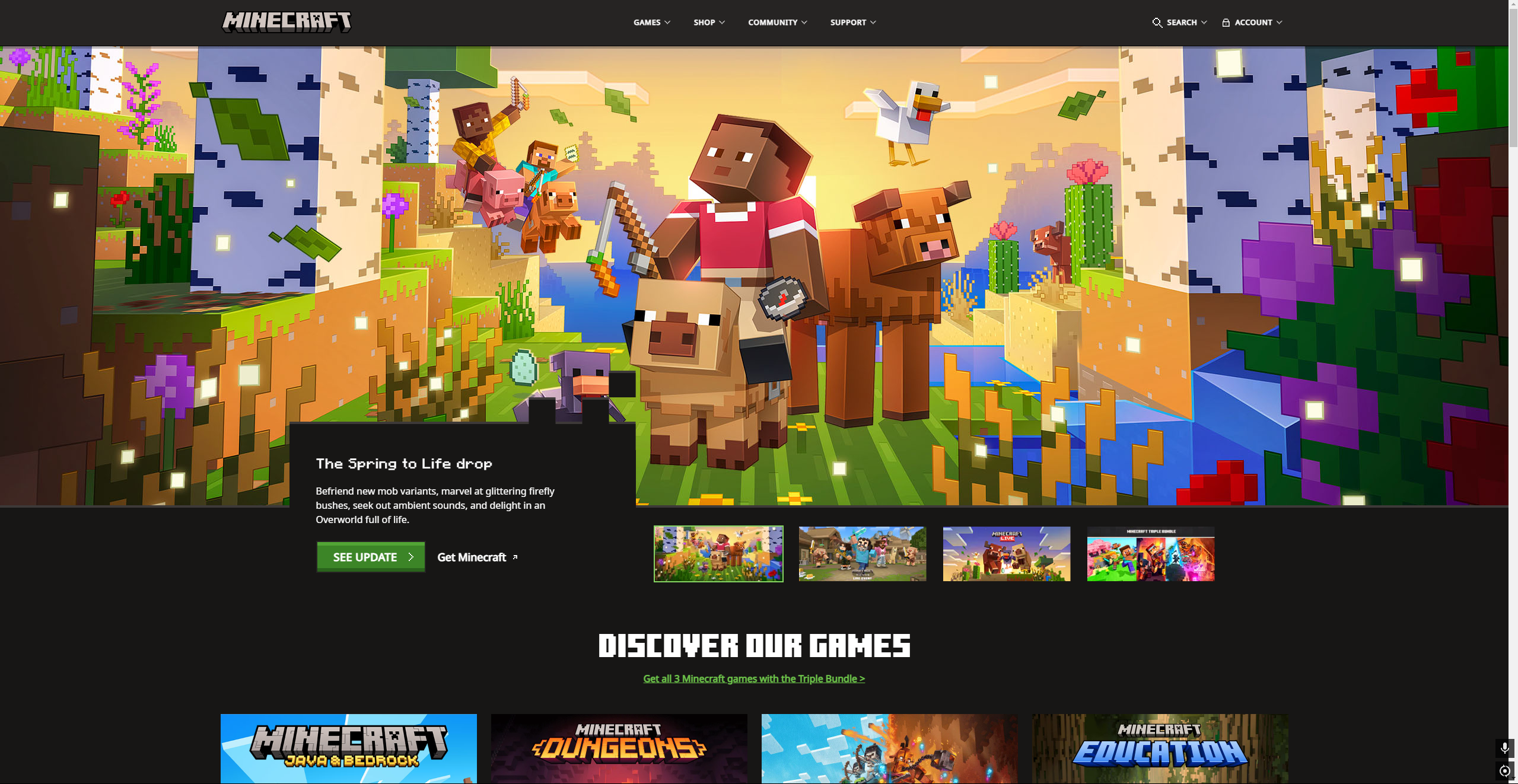
Your Minecraft account settings are more specific if you're playing Java.

2. Log Into Your Account

Head to the Account drop-down menu on the page’s top-right-hand side. Then, click Sign In.
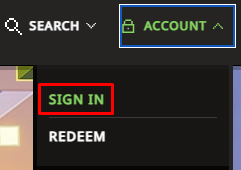
Change to a new name via the website's profile information page.

3. Select Change Profile Name

You’ll sign in with your Microsoft account and will be taken to the All Games section of your profile page.

Navigate to Minecraft: Java Edition and click Change Profile Name.
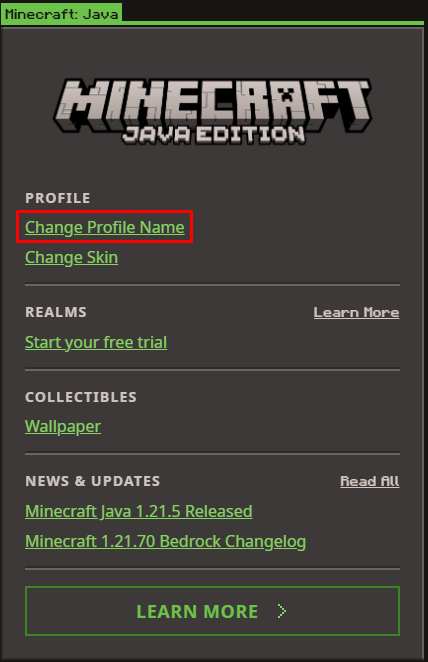
This is the default way to change your Java username. Just know this doesn't affect iPhone or iPad versions of Minecraft.

4. Input A New Username

You’ll be taken to the Change Profile Name page. Simply type in your desired username and click Change Your Profile Name. That’s it!
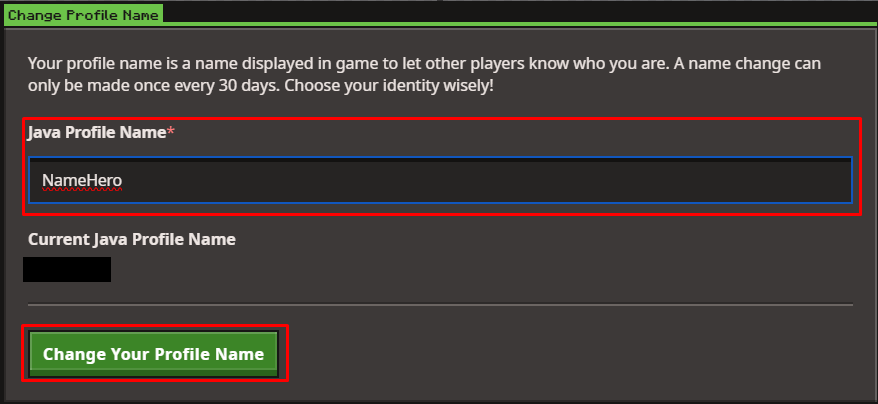
This isn't the only time you can change your name. You just have to wait 30 days to do it again.

Java Edition allows you to change your Profile Name every 30 days.

Note: You may remember Mojang Accounts from back in the day. These are no longer necessary when playing Minecraft.

How To Change Your Minecraft Username On Nintendo Switch

Arguably the easiest process of the three, changing your username on Switch is a very simple process.

1. Log Into Your Switch

Log into your Switch, and select the Profile Settings on the menu’s top-left corner.
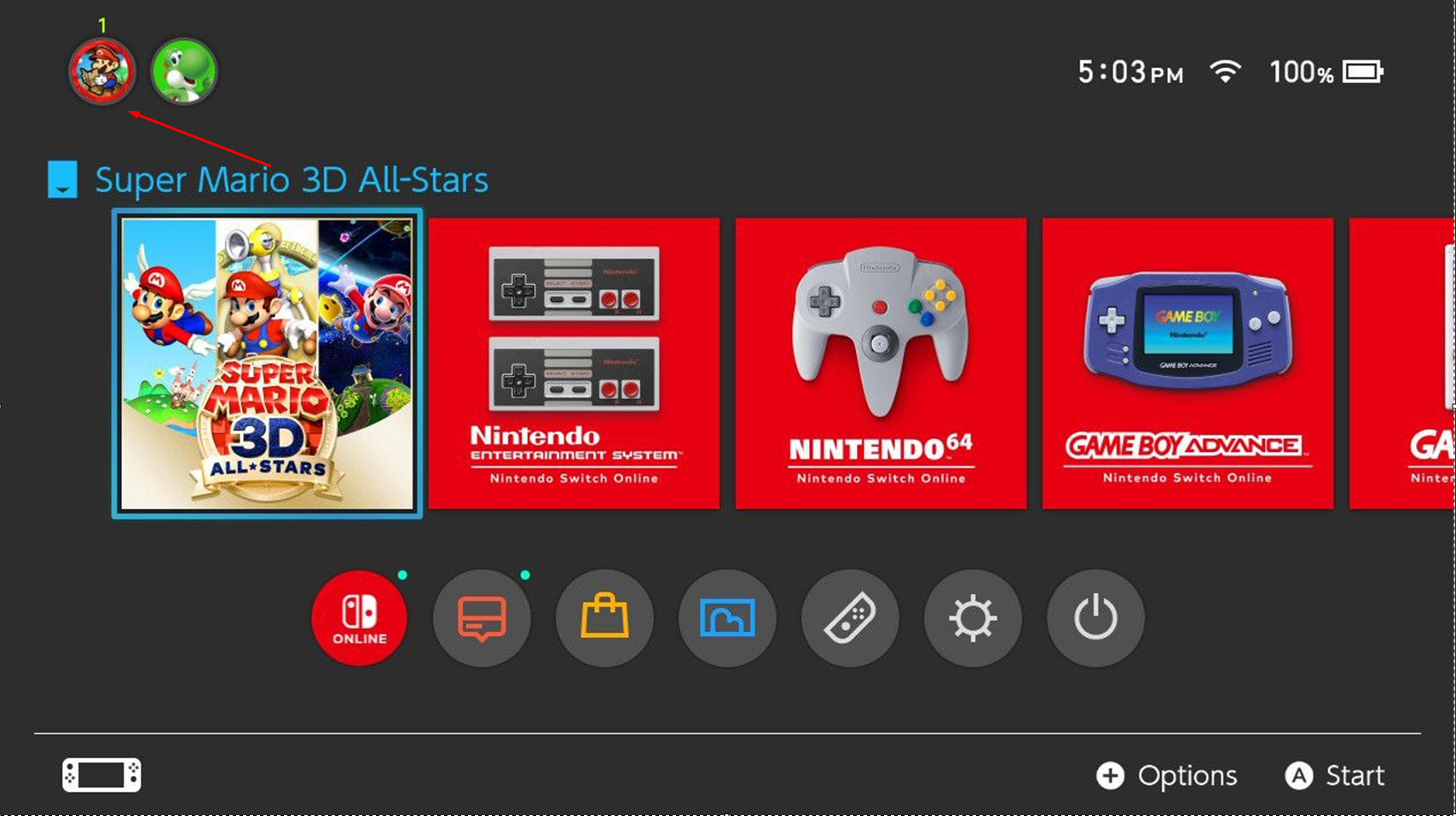
Change your username on Switch by following these simple steps!

2. Navigate To Your Profile Page

Navigate to the Profile section on the left-hand navbar.
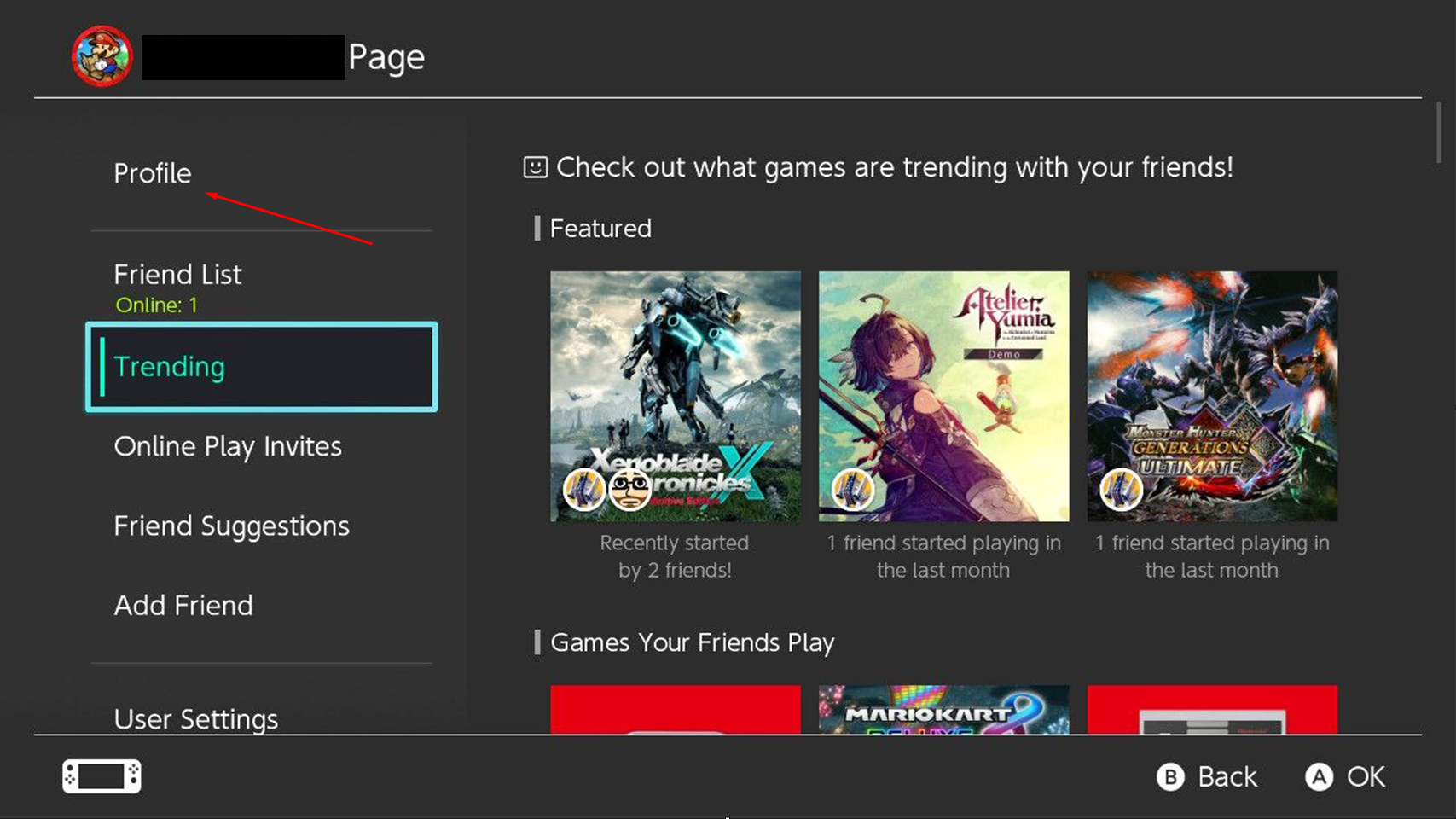
Your profile settings allow you to alter your identity.

3. Select The Pencil Icon

Click on the Pencil icon to open the username change menu.
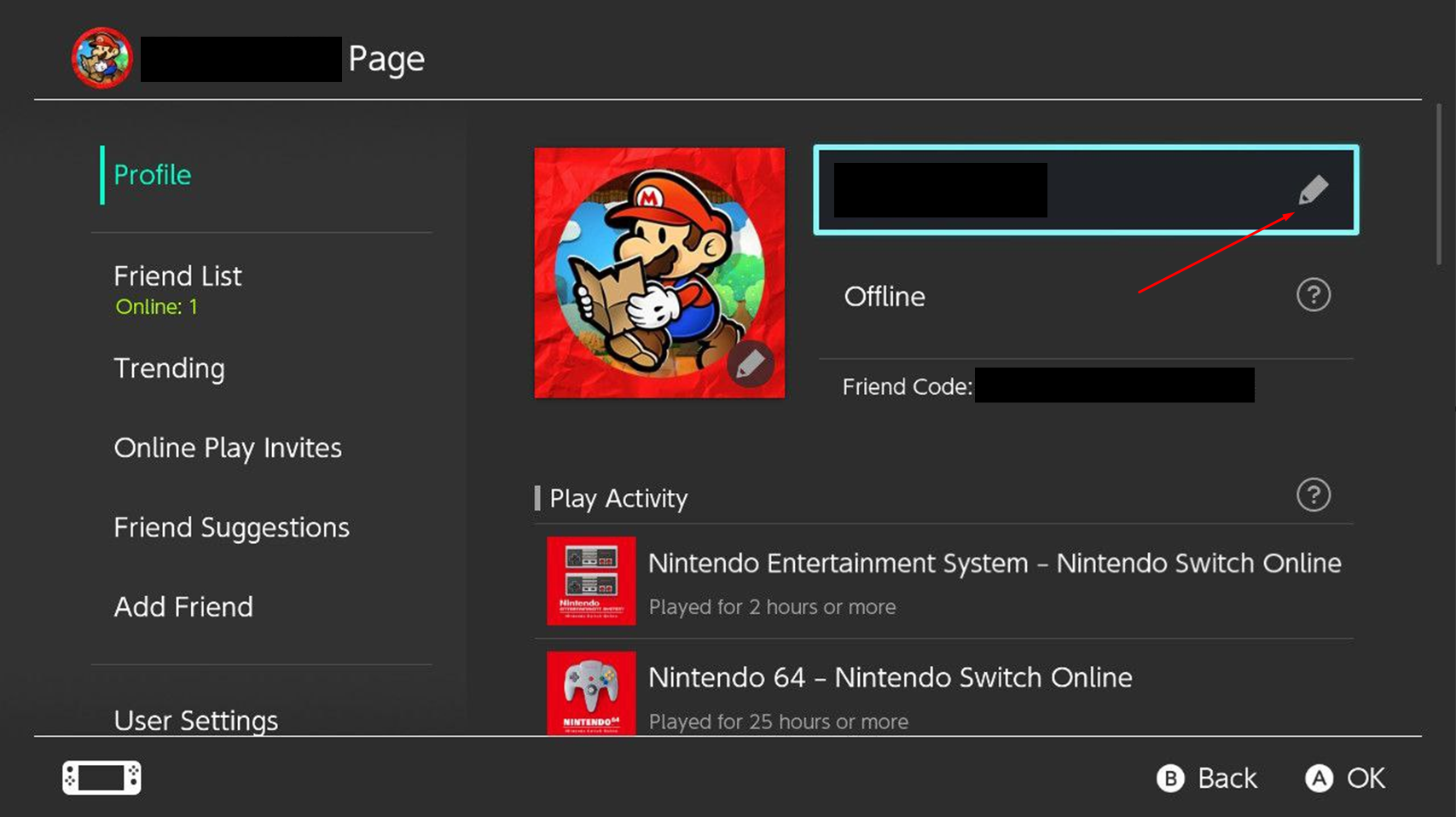
The pencil icon changes your in-game name for all Switch games.

4. Change Your Username

Type in your new username, then click OK.
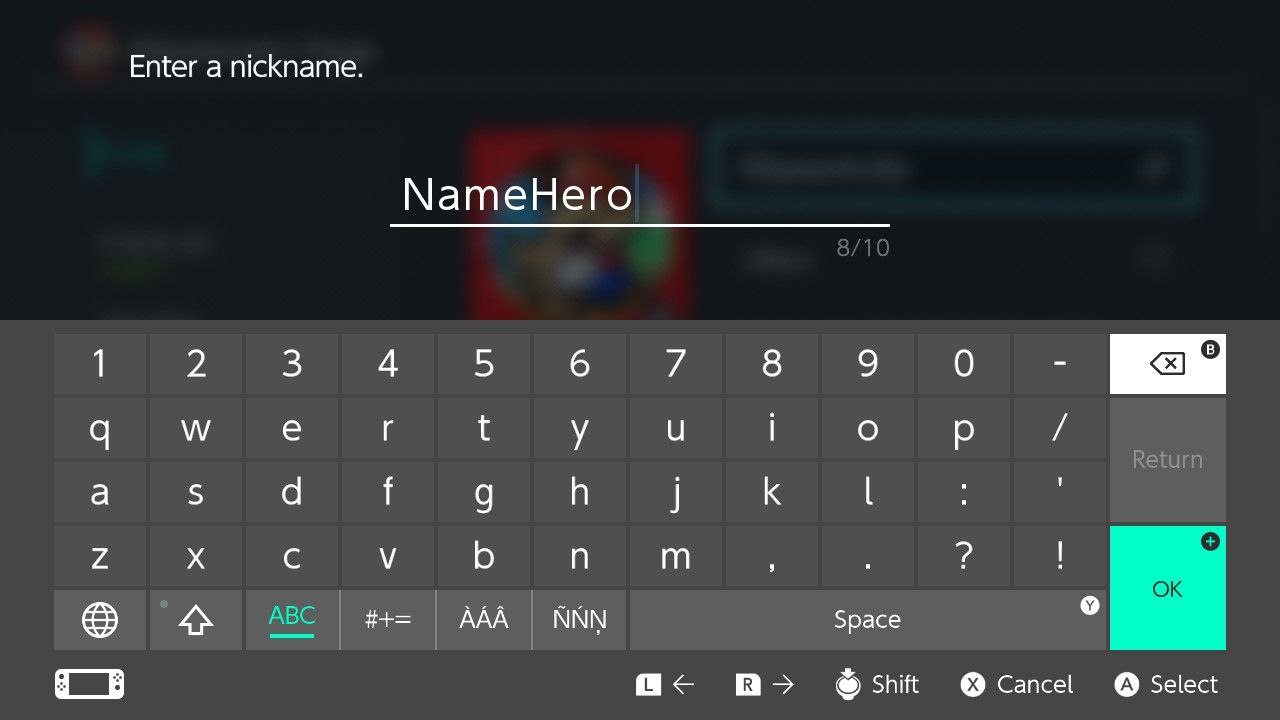
Just make sure your new username is under ten characters!

Switch username changes are free.

With these username changes in mind, now you can appear however you’d like to your friends while online.

If you’re looking to play Minecraft with your friends, check out NameHero for a comprehensive server solution.

Our servers offer support for up to 32 players, with built-in DDOS protection alongside comprehensive backups. For more information on getting a NameHero server, click here.

NameHero specializes in delivering some of the very best in gaming server tech without breaking the bank. Every Minecraft server comes with DDR4-3200 RAM, NVMe storage, AMD EPYC CPUs, and more!

Already have a server? That’s okay, come hang out with us on Discord!

Max Moeller

Max is a freelance writer with a love for gaming and technology. He’s always looking for the next big game to play and tinkers with tech in his remaining free time.

Related Posts

8 Best Minecraft Underground Base Ideas

Here are 8 of our favorite underground bases to build in Minecraft, plus we talk about why you'd want to build one and other considerations.

Minecraft Distant Horizons: A Complete Guide

We'll cover everything beginners should know about this mod, why they should use it, how to install it, the best settings, and tips.

How to Use Phantom Membranes in Minecraft: An Essential Guide

The items obtained from phantoms are useful in some cases. In this guide, we will teach you how you can obtain and use phantom membranes.

Minecraft Piglin Trading: A Quick Guide

Master Piglin trading with essential tips and strategies to maximize your success. Dive in and enhance your Minecraft experience today!

Reader Interactions

Comments

  1. Leonardo says

    July 27, 2025 at 1:38 pm

    I do every step but once i click on change gamertag, it doesn’t find the website. Has it happened to anyone else? How did they fix it?

    Reply
  2. Hero brine says

    September 21, 2025 at 12:16 am

    Hi

    Reply

Leave a Reply Cancel reply

Your email address will not be published. Required fields are marked *

This site uses Akismet to reduce spam. Learn how your comment data is processed.

Primary Sidebar

Get Started With a Minecraft Server


Looking to create your own gaming server? It only takes a few minutes.

Create Server Learn More

Most Popular Posts

How To Install Optifine

Best Minecraft Bedrock Seeds for Exploration and Adventure in 1.21

The 6 Best Spear Enchantments in Minecraft

How To Tame A Fox In Minecraft: A Quick Guide

Minecraft Cartography Table: A Complete Guide

Top 10 Breathtaking Minecraft Mountain House Designs

Best Armor Enchantments In Minecraft: Tier List

Minecraft Chicken Coop: A Quick and Efficient Guide

Minecraft Actions And Stuff Resource Pack: Ultimate Guide

How To Play Minecraft Cross-Platform On All Platforms

Join Our Gaming Discord!

Come hang out or get support!

Top Categories

  • Palworld
  • Minecraft
  • Soulmask
  • Rust
  • Stardew Valley
  • Terraria
  • Hytale
NameHero

NameHero® proudly provides web hosting to over 40,000 customers with 99.9% uptime to over 750,000 websites.

  • Master Card
  • Visa
  • American Express
  • Discover
  • Paypal
Products
  • Web Hosting
  • Managed VPS Hosting
  • Unmanaged VPS Hosting
  • Flex VPS Hosting
  • WordPress Hosting
  • WooCommerce Hosting
  • Reseller Hosting
  • Enterprise Hosting
  • GPU Hosting
  • Email Hosting
  • HeroicGuard
  • Domains
  • Website Builder
  • AI Agent Hosting
Gaming Products
  • Game Hosting
  • Minecraft Hosting
  • Palworld Hosting
  • Rust Hosting
  • Soulmask Hosting
  • Stardew Valley Hosting
  • Terraria Hosting
  • DayZ Hosting
  • Project Zomboid Hosting
  • Hytale Hosting
Help & Support
  • NameHero Blog
  • NameHero Gaming Blog
  • Support
  • Help Center
  • Migrations
  • Affiliates
  • Gaming Affiliates
  • Call 1-855-984-6263
Company
  • About Us
  • Contact Sales
  • Reviews
  • Uptime
  • We're Hiring

Copyright © 2026 Name Hero, LLC. All rights reserved.
NameHero® is a registered trademark.

  • Privacy Policy
  • Terms of Use
  • Acceptable Use Policy
  • Payment Policy
  • DMCA