• Skip to primary navigation
  • Skip to main content
  • Skip to primary sidebar
NameHero® Blog

NameHero® Blog

Web Hosting Tips & Resources From NameHero

  • AI Agents
    • OpenClaw
    • Claude Code
    • n8n
    • Hermes Agent
    • Open WebUI
    • Docker
  • Hosting
    • Web Hosting
    • WordPress Hosting
    • WooCommerce Hosting
    • Enterprise Hosting
    • Email Hosting
    • HeroicGuard
    • GPU Hosting
    • Website Builder
  • VPS
    • Managed VPS
    • Unmanaged VPS
    • Flex VPS
  • Reseller
  • Gaming
  • Domains
  • Account
  • Blog Home
  • Categories
  • Authors

Text Hermes from WhatsApp

John Kirkpatrick

Published on: September 3, 2026

Categories: Hermes Hosting 0

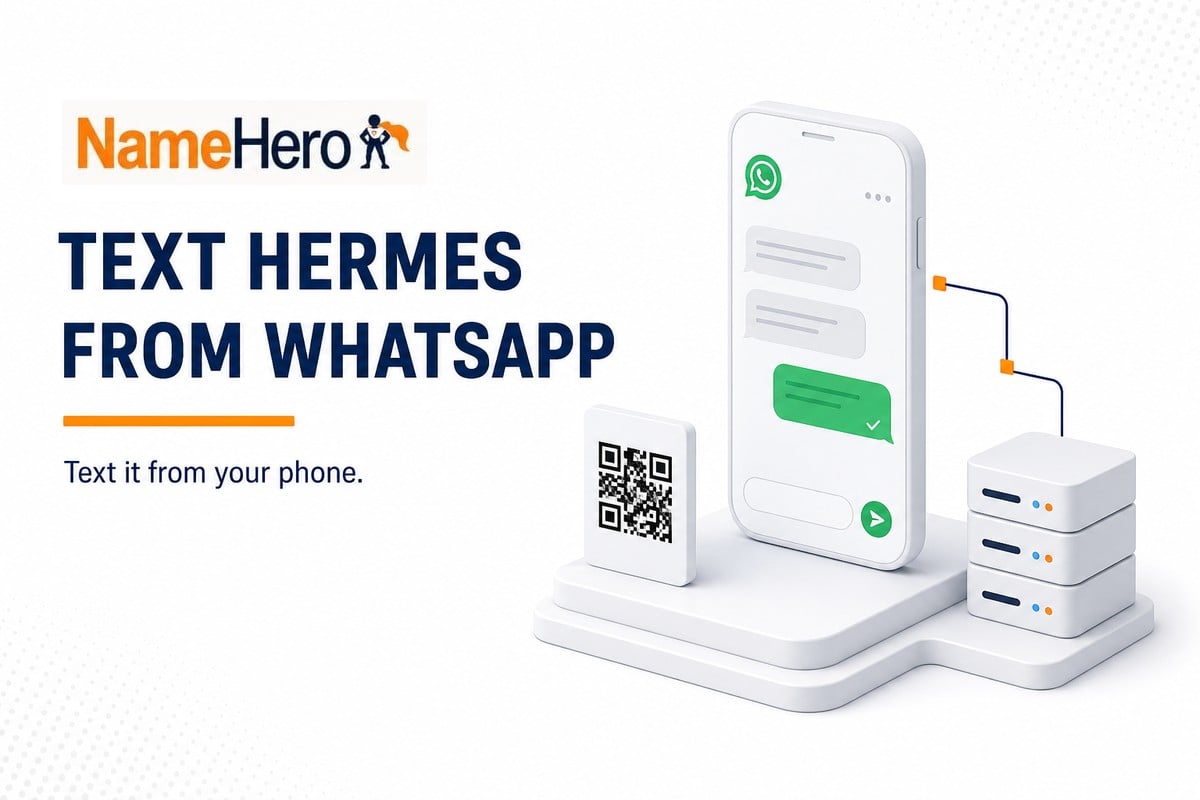
Text Hermes from WhatsApp. Scan a QR and message it from your phone.

Hermes is great to use from your computer but did you know it can go with you wherever you go?  The best part is it can use a number of “connectors” that you already have, like WhatsApp.   WhatsApp is a simply chat / messaging app used by millions around the globe.  Very similar to Telegram, you just pop it open and start talking to your Hermes bot like you would your best friend.

If you haven’t turned Hermes on yet, do the first 10 minutes first. You need it answering in the dashboard before WhatsApp will do anything useful.

What you’ll need

  • Hermes already running on a NameHero VPS
  • WhatsApp on your phone
  • Your own phone number

Open Channels

Open the Hermes dashboard. On the left, click Channels.

Scroll to WhatsApp. Leave Telegram, Slack, and the rest alone for now but if you would prefer to do one of those instead, now is the time and the setup is very similar.
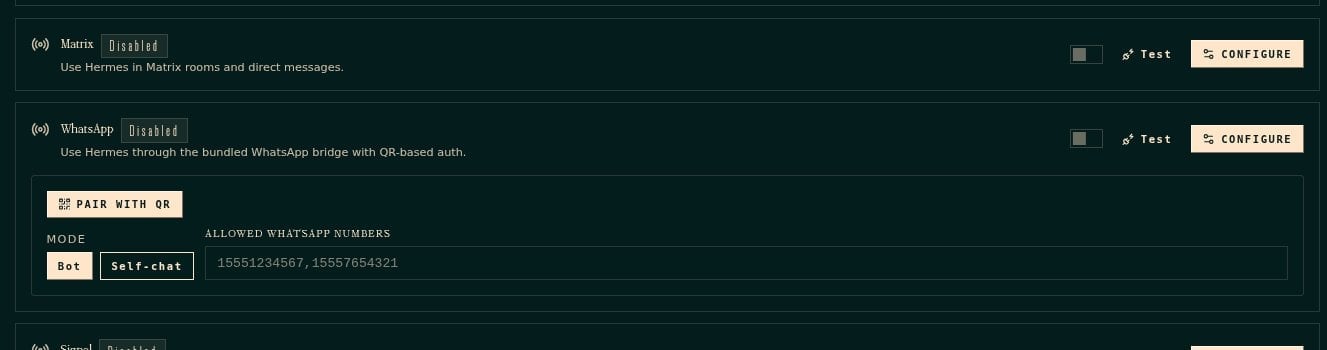
Hermes Channels page, WhatsApp row with Pair with QR and Self-chat

Click Self-chat. When you open this, Bot is already highlighted. Self-chat is the one where you text yourself. Bot is for a second phone number. Skip that for now.

In Allowed WhatsApp numbers, put your number with the country code and no plus sign. For a US phone that’s 1 plus the ten digits, like 18165551212. Delete the sample numbers sitting in that box. If you leave those in, Hermes will ignore you.

Pair with the QR

Click PAIR WITH QR. A code shows up on the right of that same WhatsApp row. It lasts about a minute.
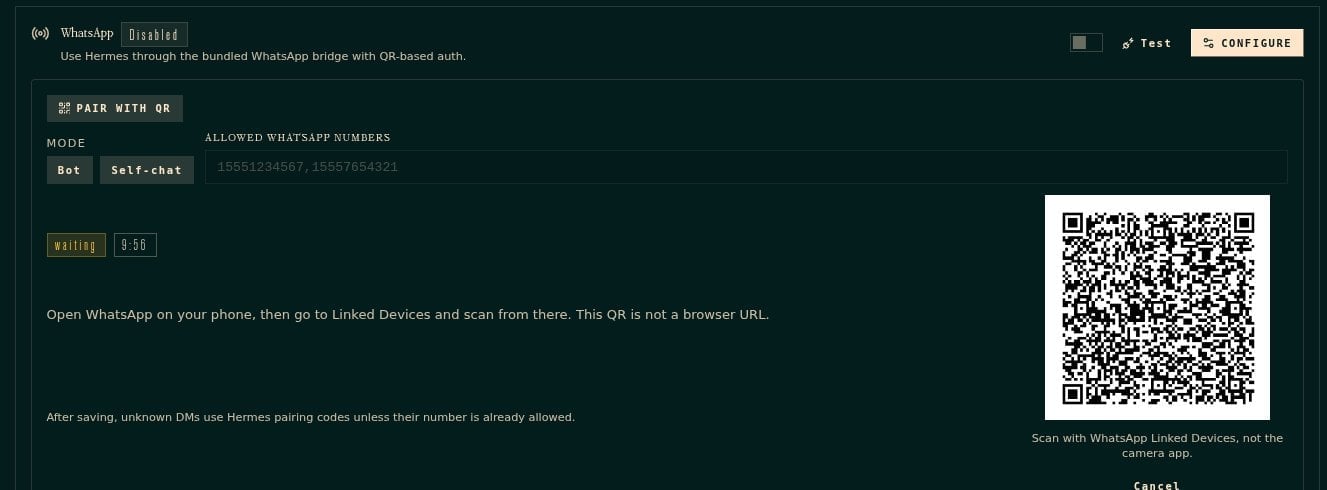
Hermes WhatsApp QR code. Scan with Linked devices, not the camera app

On your phone open WhatsApp. Go to Settings, then Linked devices, then Link a device. Scan the code from there. Do not use the regular camera app. The screen says that because the regular camera will not finish the pairing.

When it takes, flip the WhatsApp switch on. Then click Restart gateway at the top of the page. That restart is required. Give it a few seconds. The left side should still say the gateway is running.

Text it

Open WhatsApp. Open the chat with yourself. Type something you’d actually ask of the Hermes bot to start.  It can be anything or it can be part of the predefined responses we setup in the other guide.

If it doesn’t answer

The number you typed has to match the phone you scanned with, country code included. If the QR expired, click PAIR WITH QR again and scan the new one.

If you’re stuck, live-chat a SuperHero.

This is not a customer WhatsApp line if you are looking to set it up for your business. If you want shoppers texting a store number, that’s a different setup. This post is just so you can use Hermes from your pocket.

If you haven’t got a box yet, grab a Hermes Agent VPS from NameHero. Hermes is already on it.

John Kirkpatrick

John is the COO of NameHero and is an entrepreneurial, data-driven digital marketer and business operator with +16 years of experience across many different marketing channels, industries and strategies (B2C & B2B).

Related Posts

How To Use Hermes To Watch A USPS Package Until It Arrives

Ask Hermes on a NameHero VPS to watch a USPS tracking number and only ping when it is out for delivery or delivered.

Why does Hermes need a key from OpenAI or Anthropic?

Hermes lives on your server, but the thinking still comes from OpenAI or Anthropic. Here's what the API key is, why NameHero doesn't supply it, and what happens

How To Use Hermes To Write A Blog Post The Right Way

Turn a keyword into a NameHero-style blog draft with Hermes. Use ChatGPT to build the writing prompt, then draft and humanize in Hermes Chat.

How To Use Hermes To Summarize A YouTube Video

Paste a YouTube link into Hermes Chat, ask for five bullets, and get a clear summary from the video transcript without rewatching.

Reader Interactions

Leave a Reply Cancel reply

Your email address will not be published. Required fields are marked *

This site uses Akismet to reduce spam. Learn how your comment data is processed.

Primary Sidebar

Follow & Subscribe

Exclusive promos, content and more!


Most Popular Posts

NameHero’s Recommended WordPress Plugin and Theme Setup

WordPress Hosting vs. Web Hosting – What’s The Difference?

How To Increase The InnoDB Buffer Pool Size

How To Fix A Stuck All-in-One WP Migration Import

How To Add A Subdomain In Cloudflare

Top Categories

  • WordPress
  • WordPress Tutorials
  • OpenClaw Hosting
  • Enterprise Hosting
  • WooCommerce
  • Web Hosting
  • Resellers
  • Website Security
  • Website Development
  • Website Performance
  • VPS Hosting
  • SEO Tips
  • Announcements
  • Domain Registration
NameHero

NameHero® proudly provides web hosting to over 40,000 customers with 99.9% uptime to over 750,000 websites.

  • Master Card
  • Visa
  • American Express
  • Discover
  • Paypal
Products
  • Web Hosting
  • Managed VPS Hosting
  • Unmanaged VPS Hosting
  • Flex VPS Hosting
  • WordPress Hosting
  • WooCommerce Hosting
  • Reseller Hosting
  • Enterprise Hosting
  • GPU Hosting
  • Email Hosting
  • HeroicGuard
  • Domains
  • Website Builder
  • AI Agent Hosting
Help & Support
  • NameHero Blog
  • NameHero Gaming Blog
  • Support
  • Help Center
  • Migrations
  • Affiliates
  • Gaming Affiliates
  • Call 1-855-984-6263
Company
  • About Us
  • Contact Sales
  • Reviews
  • Uptime
  • We're Hiring

Copyright © 2026 Name Hero, LLC. All rights reserved.
NameHero® is a registered trademark.

  • Privacy Policy
  • Terms of Use
  • Acceptable Use Policy
  • Payment Policy
  • DMCA