• Skip to primary navigation
  • Skip to main content
  • Skip to primary sidebar
NameHero® Blog

NameHero® Blog

Web Hosting Tips & Resources From NameHero

  • AI Agents
    • OpenClaw
    • Claude Code
    • n8n
    • Hermes Agent
    • Open WebUI
    • Docker
  • Hosting
    • Web Hosting
    • WordPress Hosting
    • WooCommerce Hosting
    • Enterprise Hosting
    • Email Hosting
    • HeroicGuard
    • GPU Hosting
    • Website Builder
  • VPS
    • Managed VPS
    • Unmanaged VPS
    • Flex VPS
  • Reseller
  • Gaming
  • Domains
  • Account
  • Blog Home
  • Categories
  • Authors

You Can’t Use Your Claude Subscription for OpenClaw. Now What?

John Kirkpatrick

Published on: April 6, 2026

Categories: OpenClaw Hosting 0

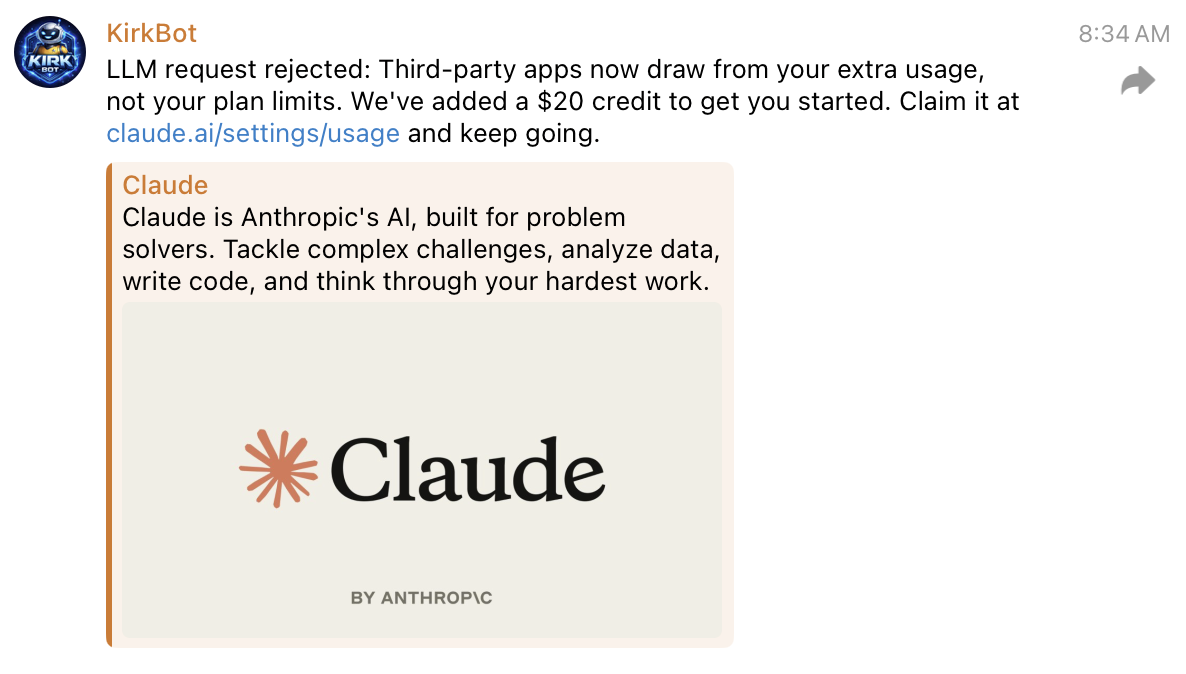
Big news dropped over the weekend… Anthropic is no longer supporting users like myself using their Claude subscription to power their OpenClaw.

I didn’t think it would be immediate so getting greeted by the message above was quite shocking this morning. So what do we do now? Let’s get back up and running in 5 minutes or less (without having to buy credits!)

Table of Contents
  • Claude -> ChatGPT Transition
  • Step #1. SSH Into Your Machine
  • Step #2: Clear The Cobwebs
  • Step #3: Evaluate / Train Your Agent

Claude -> ChatGPT Transition

Right now, the simplest path forward is switching to ChatGPT.

I would recommend setting up ChatGPT as OpenClaw just came up with a new update (2026.4.5) that should make things a lot better in terms of integration and use. This is the most economical way that I’ve found to get something comparable to Claude’s subscription. Many users on X have pivoted to other models but I’m not ready to do that yet.

Step #1. SSH Into Your Machine

Since Anthropic basically removed the ability for you to chat with your agent through traditional channels, you’ll have to SSH in and run some commands to switch models.

After SSH’ing in, you’ll need to run the command:

openclaw configure

From there, you’ll need to just walk through the configuration and select the model as OpenAI Codex (here’s how it should look once all configured):
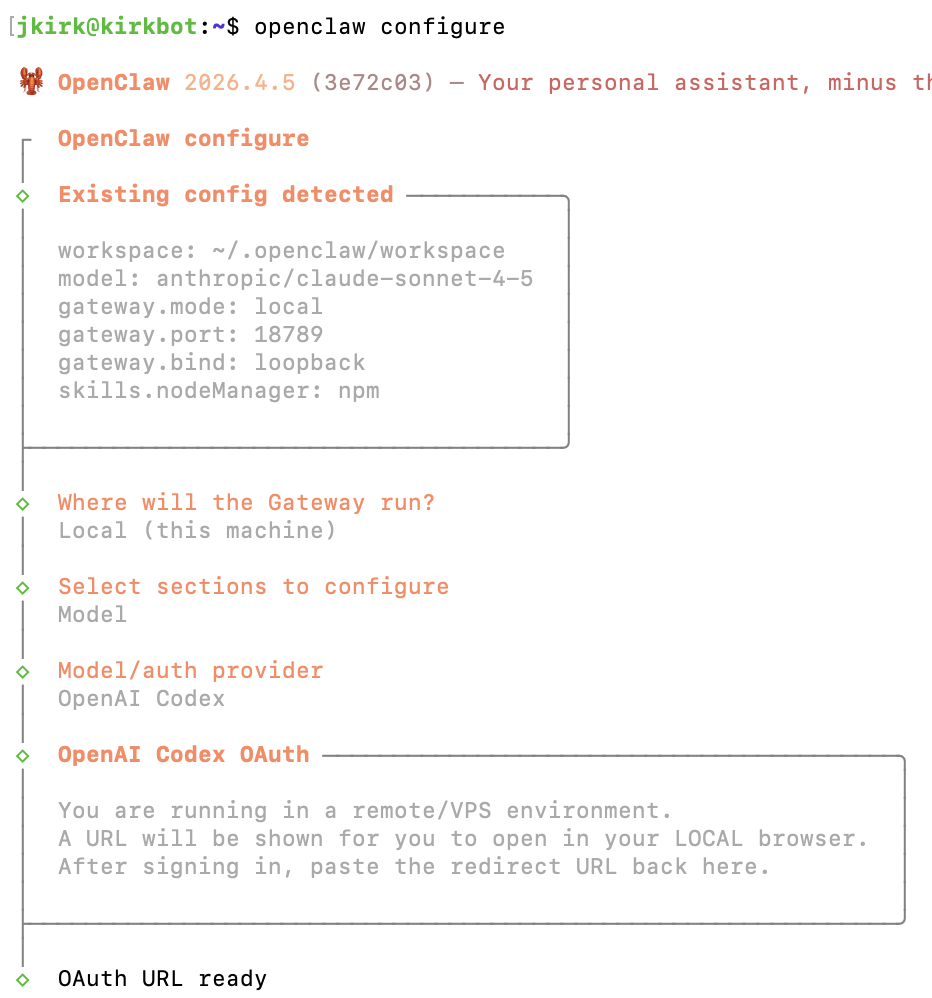
If you run into an error while pasting in your URL (after login), don’t be alarmed, still move forward with pasting your redirect URL into the interface.

This will still work despite the error and allow you to get setup.

Step #2: Clear The Cobwebs

Once you get everything switched over, there still may be some cobwebs you need to clear out. For example, I had three cron jobs that were running using Claude and had to prompt it a few times to get everything switched over with a testing period:
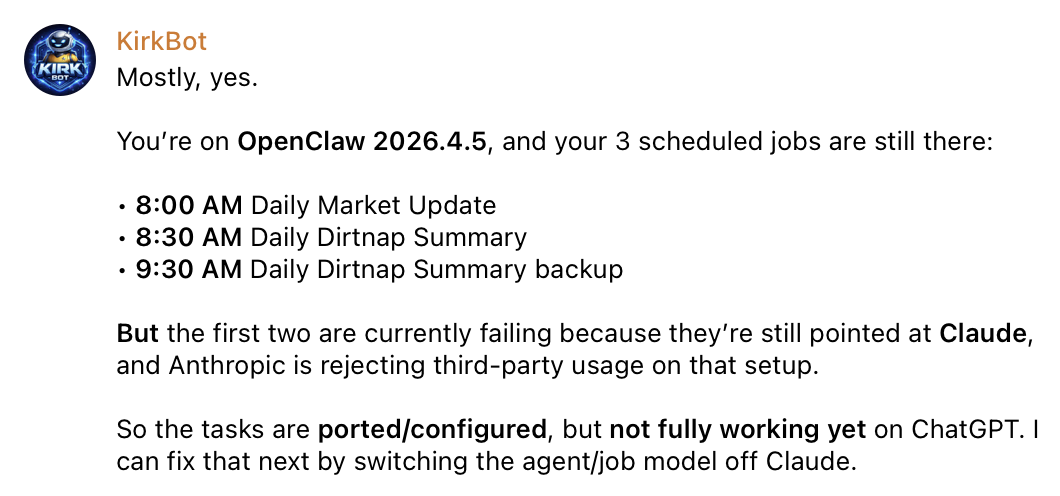
Luckily, just asking it to fix it a few times luckily worked and had to do a simple gateway restart on my Terminal.

openclaw gateway restart

Step #3: Evaluate / Train Your Agent

One thing to keep in mind: your agent no longer has the memory you built up with Claude.

You’re starting fresh.

It might take a bit of time to retrain workflows and get things behaving the way you want again.

That said, despite some of the noise on X, ChatGPT has been solid for me, especially for:

  • copywriting
  • structured workflows
  • repeatable tasks
John Kirkpatrick

John is the COO of NameHero and is an entrepreneurial, data-driven digital marketer and business operator with +16 years of experience across many different marketing channels, industries and strategies (B2C & B2B).

Related Posts

How to Connect OpenClaw to Your Claude Subscription

Learn how to connect OpenClaw to your Claude subscription using Claude Code. Skip API setup, avoid usage billing, and get running fast.

Mac Mini vs VPS vs Hardware: What’s the Best Way to Run OpenClaw?

Uncover the differences between Mac Mini vs VPS vs Physical Hardware for OpenClaw. Learn the tradeoffs for each in this simple guide.

Set Up A Free Email Inbox for Your OpenClaw Agent (Step-by-Step)

Learn how to connect an email inbox to your OpenClaw agent to summarize PDFs, respond to support tickets, reply to emails, and more!

What Is OpenClaw? AI Agent Platform Explained

Discover what OpenClaw is, how this emerging AI agent works, and why it matters for automation, workflows, and modern business efficiency.

Reader Interactions

Leave a Reply Cancel reply

Your email address will not be published. Required fields are marked *

This site uses Akismet to reduce spam. Learn how your comment data is processed.

Primary Sidebar

Follow & Subscribe

Exclusive promos, content and more!


Most Popular Posts

NameHero’s Recommended WordPress Plugin and Theme Setup

WordPress Hosting vs. Web Hosting – What’s The Difference?

How To Increase The InnoDB Buffer Pool Size

How To Fix A Stuck All-in-One WP Migration Import

How To Add A Subdomain In Cloudflare

Top Categories

  • WordPress
  • WordPress Tutorials
  • OpenClaw Hosting
  • Enterprise Hosting
  • WooCommerce
  • Web Hosting
  • Resellers
  • Website Security
  • Website Development
  • Website Performance
  • VPS Hosting
  • SEO Tips
  • Announcements
  • Domain Registration
NameHero

NameHero® proudly provides web hosting to over 40,000 customers with 99.9% uptime to over 750,000 websites.

  • Master Card
  • Visa
  • American Express
  • Discover
  • Paypal
Products
  • Web Hosting
  • Managed VPS Hosting
  • Unmanaged VPS Hosting
  • Flex VPS Hosting
  • WordPress Hosting
  • WooCommerce Hosting
  • Reseller Hosting
  • Enterprise Hosting
  • GPU Hosting
  • Email Hosting
  • HeroicGuard
  • Domains
  • Website Builder
  • AI Agent Hosting
Help & Support
  • NameHero Blog
  • NameHero Gaming Blog
  • Support
  • Help Center
  • Migrations
  • Affiliates
  • Gaming Affiliates
  • Call 1-855-984-6263
Company
  • About Us
  • Contact Sales
  • Reviews
  • Uptime
  • We're Hiring

Copyright © 2026 Name Hero, LLC. All rights reserved.
NameHero® is a registered trademark.

  • Privacy Policy
  • Terms of Use
  • Acceptable Use Policy
  • Payment Policy
  • DMCA