


Whether you’re a novelist, poet, or nonfiction writer, a well-designed website helps you connect with readers, promote your books, and establish a professional online presence. However, if you’re busy planning your next project, you probably want a website builder that does most of the work for you.
The good news is there are plenty of tools that help you launch a great website without requiring technical knowledge or a web developer. The best website builders for authors include features like pre-built templates, AI design assistants, and built-in ecommerce features (to sell your books).
In this post, we’ll take a closer look at what to look for when choosing a website creation service. We’ll then look at the best website builders for writers, and show you how to start building your author website. Let’s dive right in!
What to Look for in a Website Builder for Authors
Of course, you’ll want a builder that’s easy to use. This will enable you to design and manage your own author website, which is particularly important for self-published authors with a tight budget.
Many website building platforms feature drag-and-drop editors and pre designed templates that can be customized to align with your author brand. You’ll also get design widgets or elements (like newsletter opt-in forms, reviews, etc) that you can place anywhere on your site.
Here are some other things to look for in a website builder for authors:
- Blogging capabilities. Like many authors, you might need a blog to share updates, writing tips, and personal insights with your audience.
- Ecommerce integration. If you plan to sell books directly from your site, built-in ecommerce tools or seamless integration with platforms like Shopify is essential. You might also want a builder that lets you sell digital downloads like ebooks.
- Email list & marketing tools. Email newsletters are a powerful way to engage readers and announce new releases. Look for a builder that lets you add opt-in forms in pages and pop-ups, and integrate them with popular email marketing tools like Mailchimp.
- Social media integration. If you have social media pages, it’s a good idea to integrate them with your site. This way, you can easily share blog posts and other site content directly to these platforms, and build your following.
Another factor to consider is pricing. Many website builders will have cheap starter plans, but the price rises sharply upon renewal.
While some tools may be pricer than others, these typically contain all the features you need to run a professional website, including custom domain names, email accounts, and security tools like SSL certificates.
Top 4 Website Builders for Authors
Now, let’s look at the top website builder for authors. Note that the tools on this list can be used to design any type of website, but we’ll be highlighting features that make them ideal for authors.
1. Squarespace

Squarespace is a popular choice among creatives like authors, mainly due to its sleek and professional templates. You can edit the design of your site with a drag-and-drop builder
It also offers built-in e-commerce and marketing features. You’ll be able to create an online store for your books, design and send newsletters, and utilize SEO tools to make your site more discoverable in search engines.
Squarespace also makes it easy to sell online courses and services. This is ideal if you want to offer writing workshops and coaching sessions through your site.
Plans start at $16 a month for personal sites. If you want to sell your books, you’ll need the Business plan which costs $23 per month.
2. Wix
Wix is a popular all-in-one solution, with a selection of templates designed specifically for authors. These templates include pages like Books, In The Press, News & Events, and Bio, which you can customize with the drag-and-drop Wix editor.
Wix also has an online store builder and a blog. It also has a vast marketplace of third party apps, though most of them are premium tools with a free option.
Wix offers a complete marketing suite that includes newsletters, social media integration, and SEO tools. You can even create an ad campaign for Instagram and Facebook from your Wix dashboard.
The Light plan starts at $17 per month but has limited marketing features and no ecommerce functionality. This means you’ll need at least the Core plan ($29 per month) to sell your books and get access to more features.
3. HeroBuilder
HeroBuilder is an AI website builder that creates your site in WordPress. It gives you a large selection of templates to choose from, based on your website type and needs, and also adds all the essential pages for your author site.
If you want to sell books, HeroBuilder will automatically install WooCommerce for you. This is the leading ecommerce platform for WordPress sites and comes with built-in analytics, which is ideal for monitoring book sales.
It also sets up any other plugins you might need, like WPForms for contact and newsletter opt-in forms. Plus, you’ll also have access to the huge library of WordPress plugins, which means you can add any functionality you want to your site.
As you might already know, WordPress was primarily designed as a blogging platform. Therefore, you’ll have complete blog functionality on your site if you wish to publish articles, share updates, or promote speaking engagements.
HeroBuilder plans start at $7.46 per month. Your site will be hosted with NameHero, which is one of the most secure hosting providers.
4. Weebly

Weebly offers an affordable and easy-to-use website builder with built-in e-commerce tools. While it lacks some of the design flexibility offered by other website builders, it’s a great choice for authors who want a simple website.
You can choose a template from categories like blog, personal, portfolio, and online store. Weebly provides a drag-and-drop builder to help you customize your site, along with built-in marketing features like newsletters and SEO.
Weebly has a free plan. You’ll get a basic website with limited storage, and hosted on a subdomain (e.g., authorname.weebly.com). Paid plans start at $10 per month, but you’ll need a Professional plan to remove Weebly ads from your site. This starts at $12 per month.
The Best Website Builder for Authors (The Verdict)
There’s no denying that WordPress is the most flexible and powerful content management system. In fact, it powers over 40 percent of websites.
With a WordPress site, you’ll have complete control over your content. Plus, you won’t be restricted to built-in tools, as you’ll have access to thousands of third-party plugins and themes.
The problem is that WordPress has a steep learning curve compared to other platforms. However, HeroBuilder does most of the work for you.
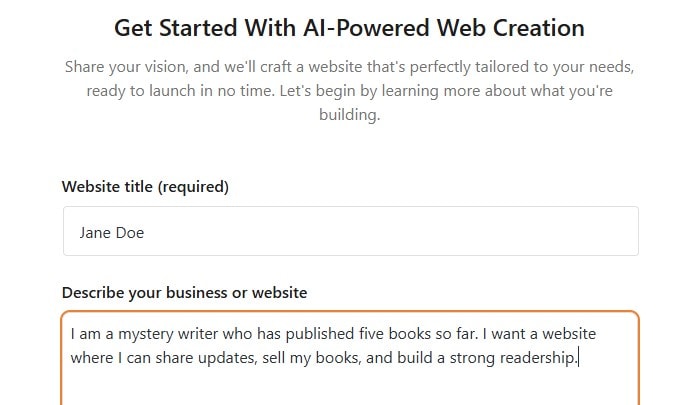
When you create a HeroBuilder account, you can provide some details about yourself and what you want the website for:
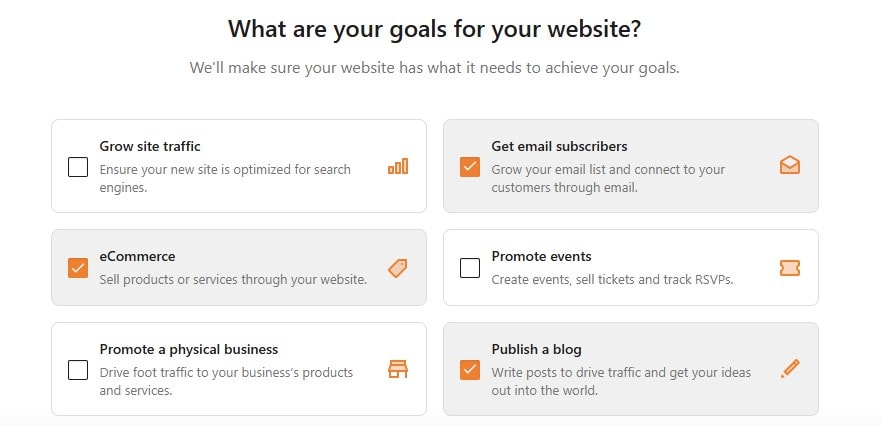
HeroBuilder also gives you a list of goals to choose from. In your case, you might want to sell your books, start a newsletter, and publish a blog:
You can also choose between a multi-page or one-page website. HeroBuilder will then generate a selection of templates based on your preferences:
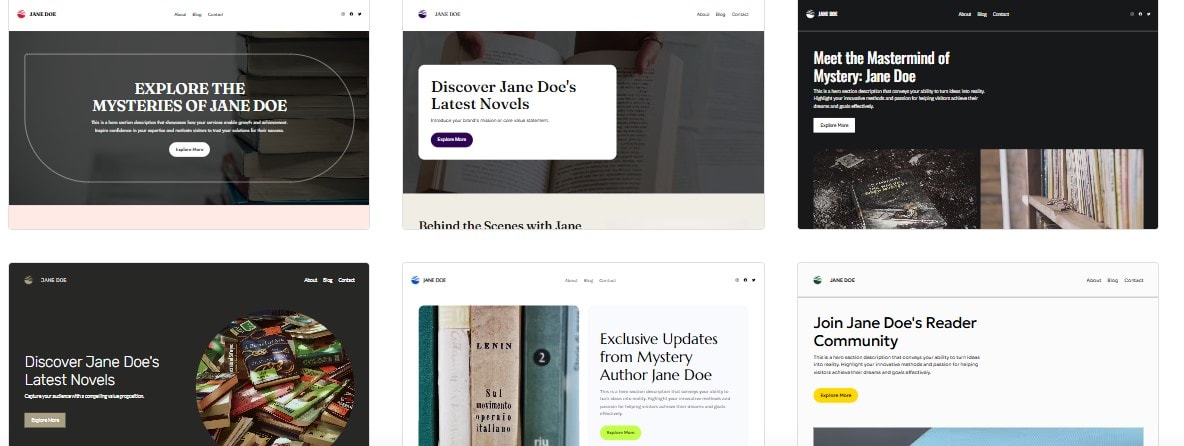
As you can see, these templates are all designed for author websites. After you select a design, HeroBuilder also asks you to choose the pages you want on your site.
Then, it will go ahead and build your website. Once it’s ready, you can customize it from the WordPress dashboard.
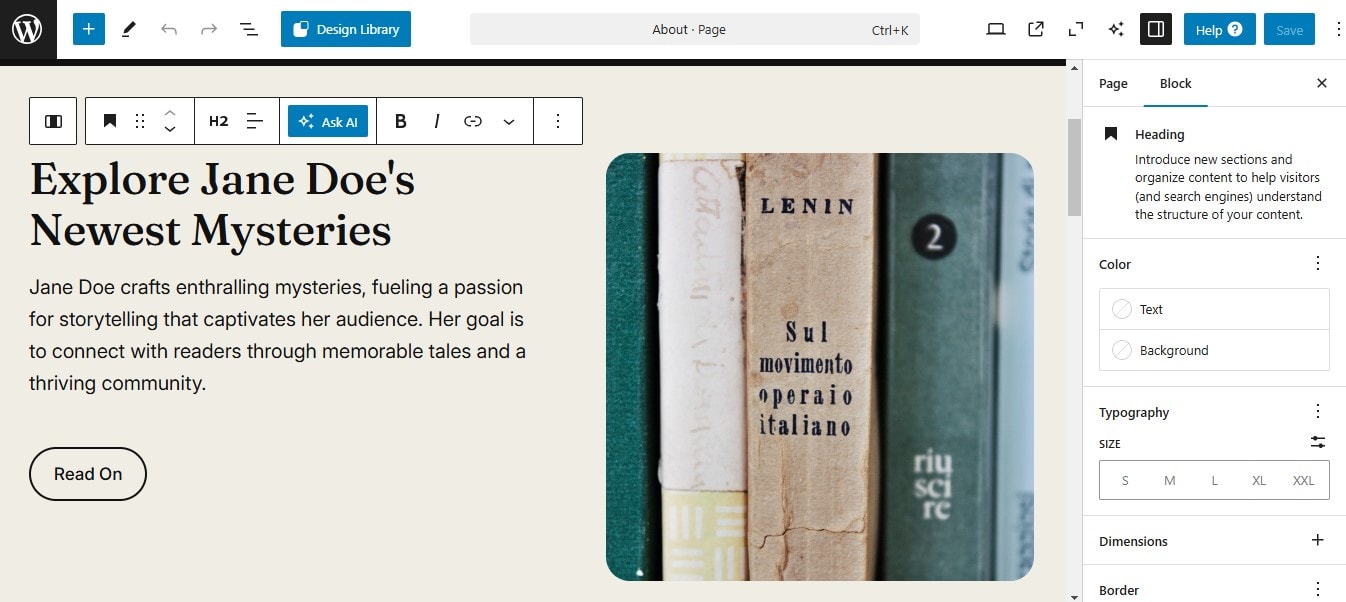
For example, if you go to Pages, you can open a page you want to edit. The Block Editor enables you to design pages using blocks for elements like headings, images, buttons, lists, and more:
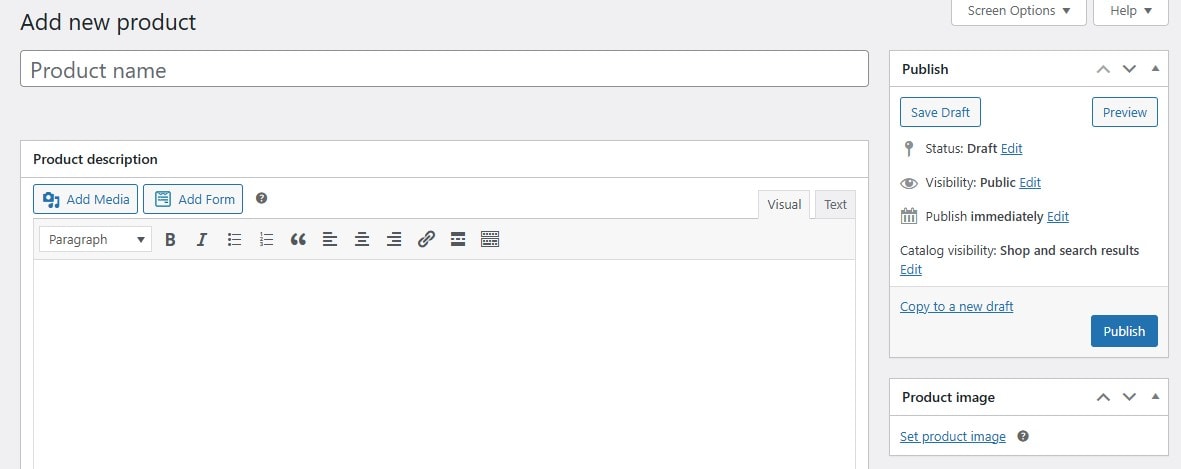
If you navigate to the Products section in the dashboard, you’ll be able to add your books. For instance, you can write a blurb, upload the cover photos, and state the price:
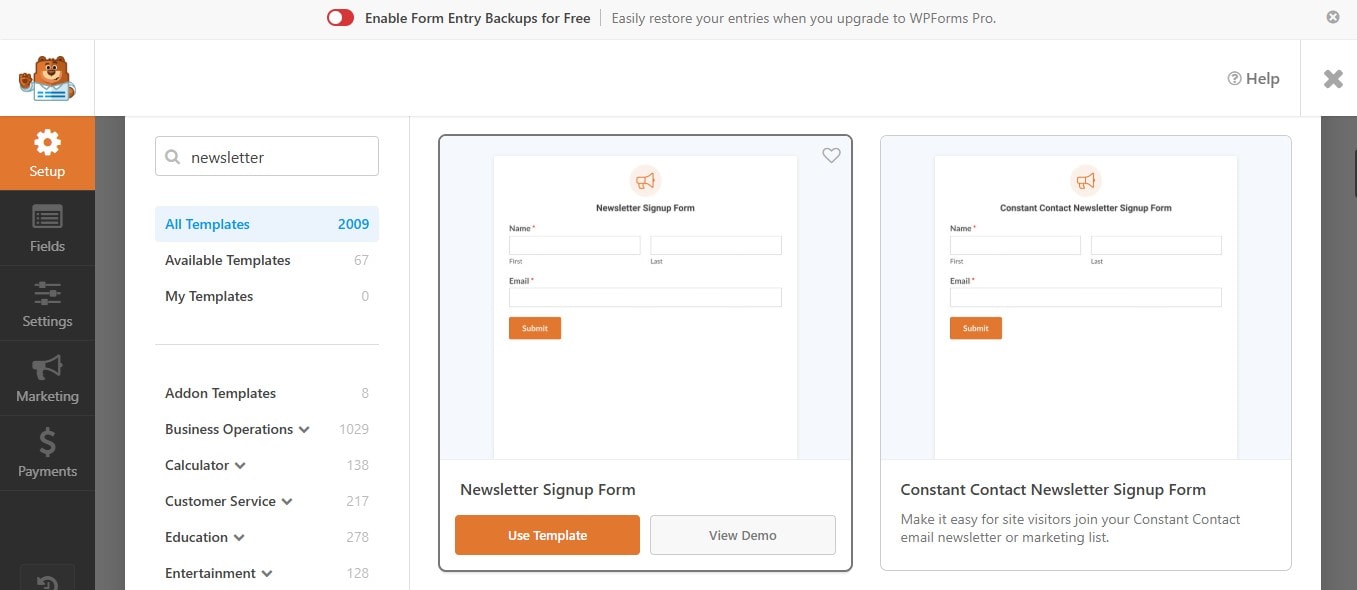
Meanwhile, you can go to WPForms to create newsletter signup forms and integrate them with your preferred email marketing tool:
Take your time to explore the WordPress dashboard. Note that HeroBuilder also offers an AI assistant that can generate web copy and images for you.
HeroBuilder has a four-day free plan. Upgrading to a premium plan will give you full access to WordPress. For example, you’ll be able to install additional plugins for more functionality. A paid plan also enables you to use your own domain name.
Conclusion
Choosing the best website builder depends on your specific needs as an author. If you prioritize ease of use, Squarespace, Weebly, or Wix may be your best bet.
For full customization and advanced features, HeroBuilder is the strongest choice. This website builder uses AI to generate a custom WordPress website for you. It also pre-installs essential plugins for you, including WooCommerce (for selling your books) and WPForms for creating newsletter signup forms.
Do you have any questions about designing an author website with HeroBuilder? Let us know in the comments section below!

Sophia is a staff writer at WordCandy.co, where she produces quality blog content for WordPress plugin and theme developers, hosting providers, website development and design agencies, and other online businesses.
Leave a Reply