
In git, the “fatal: refusing to merge unrelated histories” error occurs when you merge two branches with no common ancestor and git doesn’t know where to begin the merge. This error doesn’t occur in the normal git workflow, but it can happen when you try to combine two unrelated git projects into a single one, or you’re trying to add some changes to a remote project for the first time without doing a pull.
Normally, getting this error means that something has gone wrong, and you should check your workflow to make sure you’re not accidentally merging something you shouldn’t. That’s the whole point of the error in the first place – to protect you and warn you that something unusual is happening. But there are situations where you should ignore the error if you’re 100% confident about what you’re doing. In this case, there’s a flag you can use to merge them.
Reproducing the Error on a Linux System
Reproducing the “fatal: refusing to merge unrelated histories” is quite easy. All we need to do is:
- Create two projects
- Fetch one project while inside another’s folder
- Try and merge the two
Here’s the code. First, we create Project A:
mkdir project-a
cd project-a
git init
echo "This is project A" > file.txt
git add file.txt
git commit -m "Initial commit from project A"
cd ..
This creates the following output with the first project “A”:

Now we create the second project:
mkdir project-b
cd project-b
git init
echo "This is project B" > file.txt
git add file.txt
git commit -m "Initial commit from project B"
And here’s the output:

This time, we stay in repo “B” instead of moving into the root folder. Now we fetch project “A” and try and merge it into project “B”.
git fetch project-a
git merge project-a/master
And this is the output:
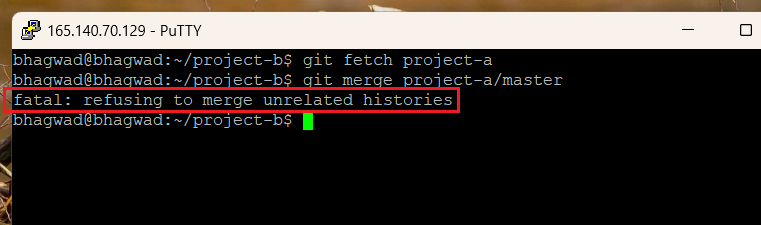
And voila, we’ve created the error! As expected, this happens because there’s no connection between the two projects. One isn’t an ancestor of the other, and neither do they share a common ancestor, which makes it impossible for git to know where to even start while combining the two.
But do we need the two projects to be related? To understand this, we need to see what happens when we try and merge a git project into another.
How Git Merges Branches
To understand why this error occurs, we need to understand how Git merges branches normally when they have a common ancestor and belong to the same project. Let’s say you have a main branch and another “feature” branch where development is ongoing on a new feature. This is a very common task, and I’d written in the past how to merge branches into the master branch. The diagram looks like this:
A --- B --- C  (main)
         \
          D --- E  (feature)
The two branches “main” and “feature” have their history, but they both link at a common point – “B”. Even though the “feature” branch has its commits not included in the “main” branch, if you travel up the tree, you’ll eventually find the common point. This common point “B” is the anchor at which git starts the merge process.
When you try and perform a merge between the two lines, git does the following:
- Finds the common ancestor (B in this case)
- Finds the differences between “B” and “C”
- Finds the differences between “B” and “E”
It then tries to combine the changes in (1) and (2) to create a project that combines the two branches. If a particular line has conflicting changes in both branches, then it explicitly asks the user to resolve the changes.
The Three-Way Merge
In git terminology, the above procedure is called a “three-way merge”. This is because this merge requires three separate commits before the branches can come together. The common ancestor is one, and the endpoints of each of the other two branches are the others.
It’s for this reason that git will refuse to merge branches that don’t have a common ancestor. A three-way merge can’t happen when there are only two merges to compare!
Overriding the Error
Now that we’ve seen how three-way merges work, and you’re aware of the reasons why git behaves the way it does, let’s see how we can override the error so that you can perform a merge of two unrelated branches. You’ll be doing this with the full knowledge that it can make things inconsistent, so use this option carefully.
To override the error, use the following flag:
--allow-unrelated-histories
So the full command to force a merge might look something like this:
git pull origin main --allow-unrelated-histories
By using this flag, you’re telling git, “Don’t worry. I know what I’m doing. Yes, this could result in inconsistent changes, but I want you to do it anyway”.
Which Actions Trigger the Error
Various scenarios can trigger the “fatal: refusing to merge unrelated histories” error. While you might wonder why anyone would try and merge two unrelated branches, it can be a surprisingly common occurrence.
Trying to Pull into an Initialized Repo
Let’s say you want to replicate a remote repo, but you mistakenly think that you first need to initialize a repo of your own in your folder, and then merge it with the remote repo, or pull from the remote. So you initialize one of your own, fetch the remote repo and try and merge it.
This will generate the error. The reason, of course, is that no three-way merge is possible since your initialized git repo and the remote repo have no common ancestor. In such a scenario, the right way to go about this is to clone the remote repo directly into your folder without first initiating an empty repo. This way, you can start working on the cloned repo immediately – no need to merge anything.
Pushing a Local Repo at the Beginning of a Project
Sometimes, if a project hasn’t gotten off the ground yet, both the remote repo and your local repo can be pretty much empty. In such a scenario, there’s no need to worry too much about conflicts. You want to work on some basic setup using your local repo, and then push it to a remote repo, even though the two don’t share a common ancestor.
However, because of the lack of a common commit, git won’t let you proceed. In such a situation, you should use the “–allow-unrelated-histories” flag as mentioned above.
Merging Independent Projects
Let’s say that you’ve developed separate git projects for the front end and the back end. Now when you try and merge these two, git won’t let you because the two don’t have a common ancestor. But in such a situation, it’s perfectly fine to merge them since they work together and don’t mess with the same files.
As before, use the overriding flag to force the merge.
Conclusion
Git doesn’t normally allow you to merge unrelated histories because of the danger of inconsistent changes. It assumes that you’ve done something wrong. However, there are situations where such merges need to happen – particularly in the early stages of a project. So to proceed regardless, you must use the “–allow-unrelated-histories” flag to tell git that you know what you’re doing and that it’s deliberate.

I’m a NameHero team member, and an expert on WordPress and web hosting. I’ve been in this industry since 2008. I’ve also developed apps on Android and have written extensive tutorials on managing Linux servers. You can contact me on my website WP-Tweaks.com!
Leave a Reply