
Command substitutions allow you to execute a command and use its output in the surrounding context. Let’s say you want to print a dynamic message – something that varies based on the system’s state – for example, the number of files in a folder. You can’t just use an echo statement and stick an “ls” and “wc” command into the middle and expect it to work. Instead, we can use command substitutions to seamlessly integrate the output of such commands into other commands. There are two syntaxes – the parentheses and the backtick syntax. The latter is older, and we use only the former now, whenever we can.
Let’s take a look at how to use command substitution and why the older backtick syntax is problematic.
The Necessity for Command Substitution
Let’s follow up on the example in the introduction. You want to print a statement like this:
"There are [xxx] files"
If we can find a way to store the output of a command into a variable, then we could simply print it like this:
"There are $file_count files"
Without command substitution, assigning the output of a command to a variable would be quite hard. We could try and use the tee command, but that’s very inconvenient, and a completely unintuitive way to go about it. What we want is to take the following command:
ls | wc -l
And assign it to a variable. Bash offers an easy alternative – command substitution. Here are the two ways to do this.
file_count=$(ls | wc -l)
and
file_count=`ls | wc -l`
In the first case, we include the command in the following parentheses – “$()”. In the second, we simply enclose it in backticks and assign it to a variable like any other. Now we can use the following command:
"There are $file_count files"
Here’s how it works:

You can see that in both cases, we’ve been able to assign the value of the “ls | wc -l” command to a variable, and then used that variable in an echo statement to show us the number of files. In a nutshell, this is how command substitution works in bash.
But command substitution is a lot more flexible than merely assigning values to variables. It can be used in any context, and bash will substitute the output in the surroundings. For example, instead of assigning the value of this command to a variable and using it, we can use command substitution directly in the “echo” command like this:

In the above screenshot, we see both syntaxes of command substitution directly in an “echo” command. No need for variable placement.
Here’s another example of where we output a date using bash command substitution:

It’s that simple to use.
The Differences Between Parentheses and Backticks
Even though both syntaxes work, these days we use parentheses wherever possible. The backtick syntax dates back to the early days of Linux and has been a part of bash since that time. Parentheses were introduced later in an attempt to become a POSIX-compliant shell. Amongst other changes, command substitutions were standardized.
But it’s not just for historical reasons that we prefer parentheses to backticks. There are real, practical reasons as well, having to do with the readability and maintainability of code. Let’s look at some of these reasons.
Nested Command Substitutions
Let’s say we need to nest one command substitution inside another. The following is an artificial example, but it shows us the complications of nested substitutions. Consider this command:
echo "There are `echo `ls | wc -l`` files in this directory."
Here, we have an echo statement inside another echo statement, which in turn consists of a command substitution. This is the output we get:
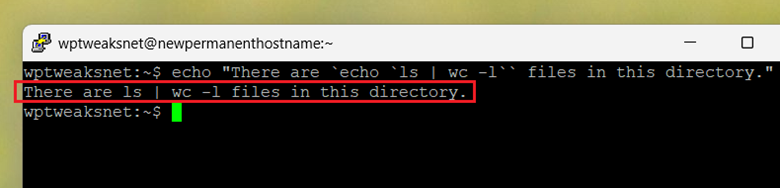
As you can see, this doesn’t give us what we want. The reason is that bash isn’t treating the nested backticks as the start of a command substitution sequence. So we’re forced to escape the backtick characters like this:
echo "There are `echo \`ls | wc -l\`` files in this directory."

Now it works, because we escape the backticks like this: “\`”. So every time we have backticks inside another set of backticks, we need to escape the characters. This messes up the ease with which we can visually scan code, particularly if some backticks (as above) follow each other consecutively, where one is escaped, and the other isn’t.
Now compare this with nested parentheses and see how much better it looks:
echo "There are $(echo $(ls | wc -l)) files in this directory."
This gives the following output:

See how much nicer it looks? The nesting is clear, and there’s no need to escape anything. We get the same output as with backticks, but with much cleaner code.
Backticks Can Get Confused with Regular Quotes
The backticks you use for command substitutions can be easily confused with regular single or double quotes, depending on the font. Some word editors, for example, automatically replace some quotes based on autocorrect settings, and this can completely mess up your command.
Consider the following picture:

In this, I’ve written two words – both of which include nested backticks – surrounded by first double, and then single quotes.
You can see that the backticks are virtually indistinguishable from the quotes (there’s a slight difference, but it’s too minor). And this is what makes backticks so dangerous. If your code editor is using the wrong font for some reason, you might be completely unable to debug your code.
For this reason, parentheses are the best way to implement command substitution in bash.
Differentiating Command Substitution from Piping and xargs
If you think that command substitution bears some similarity to xargs, you’re not alone. Many commands require the output of one command to be fed into another. The earlier tutorial on xargs shows how this works, and why sometimes using just pipes is insufficient. For a primer on how the latter works, check out this pipe tutorial.
Consider the following example. Let’s say we want to delete all text files in a directory. We can use either of these commands:
find . -name "*.txt" | xargs rm
or
rm $(find . -name "*.txt")
Both of these achieve the same thing, as you can see in this screenshot:

They work in slightly different ways, but don’t think that you can use xargs wherever you can use command substitution. Often, there’s no alternative to the latter. Just a simple example of:
echo "Folder has $(ls | wc -l) files: $(ls)"
Is impossible to replicate using xargs, where we use two command substitutions to generate the output. And in the same way, many commands are impossible without using xargs. So even though there can be some similarity between the two commands, they’re not interchangeable. Each has its own sphere of influence where it brings unique value.
Conclusion
As you can see, command substitution is a very powerful method that allows you to significantly enlarge the range of operations you can perform in bash. It comes in two types – parentheses and backticks, and because of the reasons listed above, we exclusively use parentheses whenever possible. It’s cleaner, doesn’t require escaping characters, and the syntax can’t be confused with other common syntax elements like single or double quotation marks.

I’m a NameHero team member, and an expert on WordPress and web hosting. I’ve been in this industry since 2008. I’ve also developed apps on Android and have written extensive tutorials on managing Linux servers. You can contact me on my website WP-Tweaks.com!
Leave a Reply