
Bash scripts allow you to use variables, and that includes arrays. The idea behind bash arrays is the same as that in other languages. A way to store many pieces of data sequentially, using the same identifier and an index. This allows you to iterate through the array and pick out each datum one by one, usually through a “for” loop. In this tutorial, I’ll explain how bash arrays work, how we declare and manipulate them, how we refer to them, and how we iterate through them. Finally, we’ll look at some best practices and pitfalls.
Declaring Arrays in Bash
Bash makes it easy to declare arrays in a variety of ways. There are three ways this can happen.
Explicit Declaration
We can explicitly define an array in bash like this:
declare -a fruits
This tells bash that you’re creating an array, but haven’t assigned anything to it yet. Even though we can declare arrays on the fly, declaring them explicitly like this is often good for readability purposes. In addition, we can define the scope of the array by explicitly declaring it locally like this:
local -a fruits
When used inside a function, the above declaration will ensure that the scope of the array is restricted to inside the function. Without this, you might accidentally modify an existing global variable, or you’ll create a global variable. When functions want to use intuitive variable names for their specific purposes, declaring the variable locally is very useful.
Initializing with Values
You can also create an array by directly initializing it like this:
fruits=("apple" "banana" "cherry")
This will create an array called “fruits”, initialized with the three fruits. Here’s what it looks like:

You can see that I’ve used a special command “${fruits[@]}” to display all the contents in the array. More on that later.
Initialize with Index Assignment
You can explicitly refer to the indices of an array to create it. For example:
hardware[0]="screws"
hardware[3]="spanners"
This creates an array called “hardware” that has only two of its indices defined – also known as a “sparse” array. You need to be careful with sparse arrays, because they can behave unexpectedly when you attempt to access an index that doesn’t exist. But the declaration itself is perfectly valid, as you can see here:

A possible use of this might be a use case where you’re assigning values to, say, seats in a theatre, while the other seats are empty. Instead of initializing the entire array with all the other seats set to a blank value, you need only initialize those indices that have values.
Reading into an Array from a Command Output
You can also create an array from the output of a command. For example:
files=($(ls *.txt))
NOTE: The above command is only for illustration. In real life, you must never parse the output of ls like this. The “ls” command’s output is for humans, and not for machines.
Nevertheless, the above command appears to work for simple use cases, as shown here:

In reality, you’ll face problems if the file names have spaces, slashes, newlines, etc. Additionally, the format can change depending on the environment, so avoid using it in this manner.
The above methods demonstrate how to initialize an array in bash. Now let’s see how to access them.
Accessing Array Elements
You can access the elements of any array directly by referring to its index value, like this:
echo ${fruits[0]}
You can also access the last value (if you don’t know the length of the array) like this:
echo ${fruits[-1]}
The above only works in Bash 4.2+.
Getting the Characteristics of an Array
When working with arrays, it’s often useful to know more about them before you start exploring them. Otherwise, you risk trying to access something that doesn’t exist – for example, trying to use an index that’s out of bounds. For exploring arrays, there are two useful commands.
Getting the Length of an Array
It’s very useful to know the length of an array. We do this using the following command:
echo ${#fruits[@]}
The above command will get the length of the array – that is, the number of elements in the array, not the maximum index of the array, plus one. Here’s how it works:
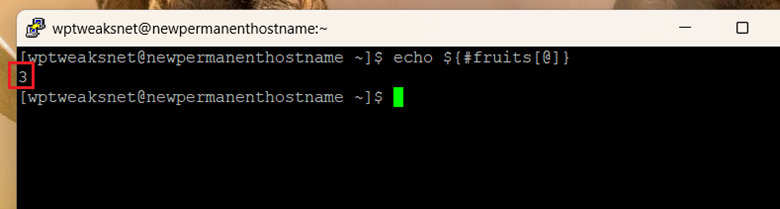
Since we’d earlier defined the array as containing three fruits, this gives us the number “3”. However, you must be careful when dealing with sparse. For example, the following array:
fruits[0]="apple"
fruits[3]="orange"
Has just two elements. But those two elements occupy the 1st and 4th indices. Despite this, the length will be “2” as shown here:
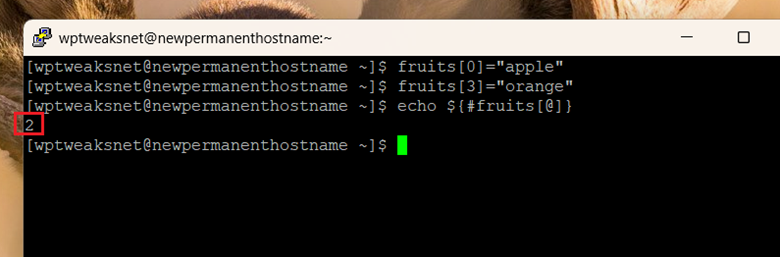
You need to be careful when getting the length of sparse arrays if you’re going to use the length for iteration over the elements of the array, since you will end up terminating the loop early.
Getting the Array’s Indices
The other way to examine an array is to get its indices rather than its length. For example, the following command:
echo ${!fruits[@]}
Will print the array indices from 0 to the maximum index. Here’s what it looks like using the “fruits” sparse array we just saw:

You can see that we get only the filled indices instead of all of them. So while traversing an array, we use the second command, and not the first.
Safely Traversing Arrays
A very common operation when working with arrays is to iterate through them and access the elements one by one. In other programming languages, we learn that the simplest way to do this is by creating a “for loop” running from 0 up until the array’s length and then using the index variable to access the value. But in bash, the following is dangerous for the following array:
fruits[0]="apple"
fruits[3]="orange"
Do NOT do:
for ((i=0; i<${#fruits[@]}; i++)); do
    echo "${fruits[i]}"
done
For our example above, the variable “i” will terminate on the second index because the length of the array is just “2”, even though there are four indices.

As you can see, the loop stops after the second index, because the “i” variable will never reach “3”. In order to safely iterate over sparse arrays, we should use the indices command we learnt earlier. So this will work:
for i in "${!fruits[@]}"; do
    echo "Index $i: ${fruits[i]}"
done
Here’s a screenshot:
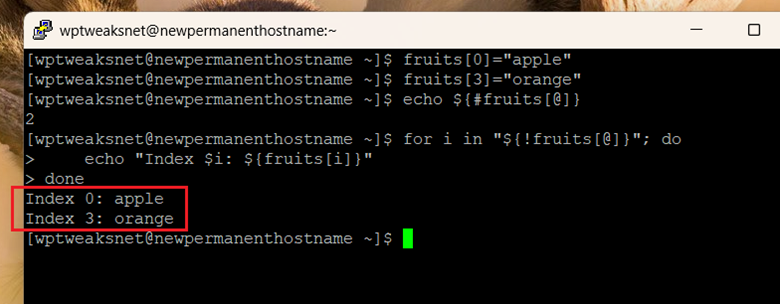
As you can see, we can now access all the elements of the array, even though there are gaps in the indices. In general, it’s always best to use the indices command to iterate through the array rather than the length, because it achieves the same thing without the danger posed by sparse arrays.
Iterating Directly Over the Values
Instead of using indices, we can also directly iterate over the array values using:
for fruit in "${fruits[@]}"; do
    echo "$fruit"
done
This is almost always easier. The only disadvantage is that you don’t get the index value, which might be a hindrance for some position-based applications. Here’s how it works:

For most purposes in coding, this approach is easier.
Conclusion
As you can see, bash possesses a comprehensive set of tools for creating, evaluating, and iterating through arrays. While you need to be wary of some pitfalls, they’re easy to avoid, and you’ll soon be proficient in arrays after using them just a few times!

I’m a NameHero team member, and an expert on WordPress and web hosting. I’ve been in this industry since 2008. I’ve also developed apps on Android and have written extensive tutorials on managing Linux servers. You can contact me on my website WP-Tweaks.com!
Leave a Reply