


Attackers do not always try to hack your website. They might instead create a copy of it and use it to deceive people into sharing sensitive information or to spread malicious content. This is called website spoofing, and it can have serious consequences on your business.
Although spoofed websites aren’t affiliated with you, it’s still important that you know how to counteract them. This will help you avoid situations where your site’s reputation takes a hit due to malicious copies on the web, and users being unable to tell the difference between the legitimate site and the fake one.
In this article, we’ll talk more about how website spoofing works and how it’s different from domain spoofing. We’ll then go over several methods to help you tackle it. Let’s get to it!
What Is a Spoofed Website?
A spoofed website is a copy of an existing site that’s meant to trick users into believing they’re visiting an authentic page. This problem is more prevalent than you might think. In April 2024 alone, the US Justice Department seized four domains that were used to create over 40,000 fake websites.
Spoofed websites can be incredibly detailed. Many users might not even notice that it’s not a legitimate site.
Having rogue copies of your website can be problematic. If your website handles sensitive data like payment details, attackers can create a copy of it to trick users into forfeiting that information.
The Differences Between Website and Domain Spoofing
Domain and website spoofing typically go hand in hand. Domain spoofing is when attackers use a domain that’s very similar to a legitimate one.
Users who do not pay close attention to the URL in their navigation bar can be easily fooled by the fake website.
Domain spoofing is a problem that’s faced by many popular sites. Some prominent businesses, such as Google, buy many domains that are similar to their own to make it difficult for attackers to copy them.
Having a domain that closely resembles the original can be a lot easier than you might imagine. Take these two URLs, for example:
- arcticequipment.com
- articequipment.com
At first glance, these domains look identical. But if you take a closer look, you’ll see that there’s a letter missing from the second domain.
Since registering domains can be relatively cheap, attackers will be tempted to invest in a fake domain name if it helps them create a more effective scam website.
4 Ways to Protect Your Business Against Website Spoofing
It’s important to understand that if someone is determined to spoof your website, they will likely be successful. However, there are several things you can do to prevent website spoofing (to some degree) and deal with these scam sites should they come up.
1. Choose a Reputable Domain Registrar
Your choice of registrar can make it more difficult for attackers to access your contact information. This is important as they can then use this information to make their fraudulent website look more legitimate.
Domain registration information is open to the public. Most reputable registrars will protect your privacy by hiding this information and using their own instead.
This way, when someone performs a WHOIS lookup, they’ll see the registrar’s information instead of your own:

If you use a privacy-focused registrar, attackers won’t be able to see who registered the domain. They also won’t be able to find your contact information, which can help prevent email spoofing.
When registering a domain, make sure that the web registrar offers privacy options. If you’re using NameHero, you’ll see an option called ID Protection which you can add to your new domain:

This feature will protect your privacy during WHOIS lookups and help you prevent website spoofing.
2. Set Up a Secure Sockets Layer (SSL) Certificate
An SSL certificate is digital proof of your website’s authenticity. Having an SSL certificate also enables you to use HTTPS for your website, which can help further protect user data by encrypting it during transit.
SSL certificates have become nearly ubiquitous within the last few years. In fact, 65 percent of the top million websites use SSL certificates.
It can be harder for fake websites to obtain SSL certificates. Therefore, if you notice that a website doesn’t have this certificate, it can be a sign that it’s spoofed.
More importantly, all major browsers will warn you if you’re trying to access a website without a valid certificate. This warning can scare away a lot of users, which can make the spoofed version of your website all the more obvious.
Depending on the hosting provider, you might not need to worry about setting up an SSL certificate. For example, NameHero offers free SSL certificates with automatic setup on all hosting plans.
3. Register Similar Website Domains
Registering domains that are similar to yours can help you prevent a spoofing attack. The downside is that you may end up spending a lot of money.
You may want to consider this approach if you’re trying to grow a business and establish authority in your niche. Spoofed websites can have a significant impact on your bottom line. Plus, they can destroy the reputation that you have worked hard to build.
If you choose to register domains similar to yours, you’ll want to use a registrar that offers competitive pricing to keep costs low. NameHero offers some of the best prices for domain names (even for expensive TLDs such as .ai).
You can use our domain registration service to look up prices and compare them with other registrars:
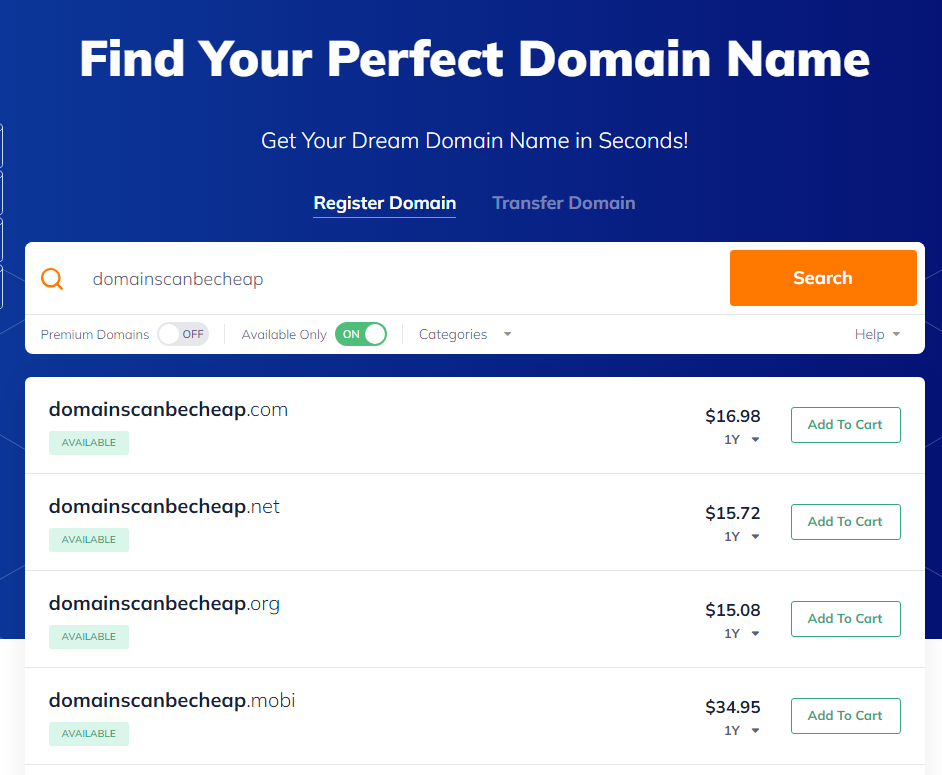
When considering which domains to register, start with the ones that are very similar to the original domain, and that users might mistakenly visit if they make a typo while entering your address in the search bar.
4. Report the Website
If there’s already a spoofing website that targets your business, your first course of action should be to report it.
Reporting website spoofing incidents can help you prevent future attacks because it can act as a deterrent. If attackers know you’ll be aggressive in reporting fake websites, they can decide to move on to an easier target.
You can try filing a report with the spoofed site’s hosting provider as well as Google. The latter offers a simple report form you can fill out:

Finding out what hosting provider a fake website uses can be difficult Your best bet is to run a WHOIS lookup to see if the domain’s contact information is available.
However, with spoofing attacks, it’s unlikely that the registrants will include their real contact information. Even so, WHOIS lookups can reveal a website’s nameservers, which can help you identify its hosting provider.
Once you have that information, you can contact them and ask them to remove the offending website.
Conclusion
Website spoofing can be a significant problem. If attackers make a copy of your website, they can use it to spread malware and steal sensitive information. This can affect your reputation, and since spoofed websites can look like carbon copies of yours, it can be hard to tell them apart.
If you’re concerned about website spoofing, here’s what you can do to avoid it:
- Choose a reputable domain registrar.
- Set up an SSL certificate.
- Register similar website domains.
- Report the website.
At NameHero, we offer website hosting that includes free SSL certificates, which can help you combat website spoofing. Check out our website hosting plans!

Sophia is a staff writer at WordCandy.co, where she produces quality blog content for WordPress plugin and theme developers, hosting providers, website development and design agencies, and other online businesses.
Leave a Reply