

The dns_probe_finished_nxdomain error is a standard browser error. It can be annoying when trying to access a website; you get a message with this error instead.
The dns_probe_finished_nxdomain error occurs when a website’s domain name server isn’t found.
This error message typically appears when your browser cannot resolve the website’s DNS.
In this article, I will explain what the dns_probe_finished_nxdomain error means. I will also share five easy ways to fix this error message. Let’s get started!
What Does The DNS_PROBE_FINISHED_NXDOMAIN Error Mean?
Before we dive in to fix this error message, let’s first understand what this message even means.
The dns_probe_finished_nxdomain error is a common browser error. It shows up when the DNS server cannot resolve the domain name, causing the browser to fail to load the website.
This DNS probe error message can occur on any browser, including Google Chrome, Firefox, Safari, and Internet Explorer.
DNS (Domain Name System) translates the domain name of a website into an IP address, which is required to access any website. Without the DNS, it would be almost impossible to browse the web!
Possible Causes Of The DNS_PROBE_FINISHED_NXDOMAIN Error
Many factors can cause the dns_probe_finished_nxdomain error to show up for you.
Some common causes include:
#1. DNS Server Issues
The error message may show up when there are problems with the DNS server. If your DNS server is down, it will result in the dns_probe_finished_nxdomain error message.
#2. Incorrect DNS settings
Misconfigured DNS settings on your router can trigger this error message.
#3. Firewall Or Antivirus Software
Sometimes firewalls or antivirus software can interfere with your network settings. Your firewall or antivirus could block the website you want to access. And cause the dns_probe_finished_nxdomain error message to show up.
#4. Browser Cache
The browser cache stores temporary files, which can cause the dns_probe_finished_nxdomain error. If your browser’s c
ache and cookies are corrupt, it can lead to this error message.
#5. ISP Issues
Your Internet Service Provider (ISP) may be experiencing problems. This can cause the dns_probe_finished_nxdomain error.
5 Ways To Fix DNS_PROBE_FINISHED_NXDOMAIN Error Message
Now that we have identified some possible causes behind the dns_probe_finished_nxdomain error, let’s discuss five easy ways to fix it.
#1. Check Your Internet Connection
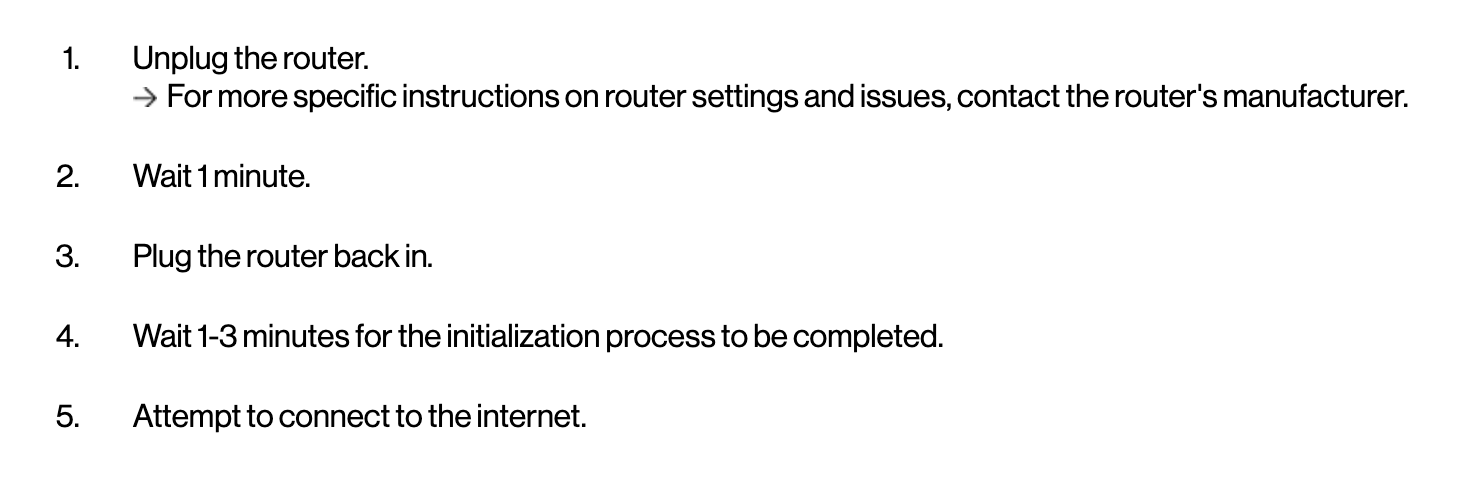
Check your network settings and make sure you have a stable internet connection. Try resetting your router to see if it resolves the issue.
To reboot your router, simply unplug it and wait 30 seconds before plugging it back in and restarting. Some routers even have a reset button on the device itself to restore the settings.
Each router brand provides easy-to-follow tutorials on how to reset or reboot your router.
Check out the screenshot below from Verizon’s website, which shows you how to reboot their router:
#2. Clear Your Browser Cache
Clearing your browser cache may help fix the issue.
To clear the Google Chrome browser cache, go to the three vertical dots in the top right corner of your Chrome window. Next, click on “More Tools,” select “Clear browsing data,” then select “Cached images and files,” select “All time,” and click on “Clear data.”
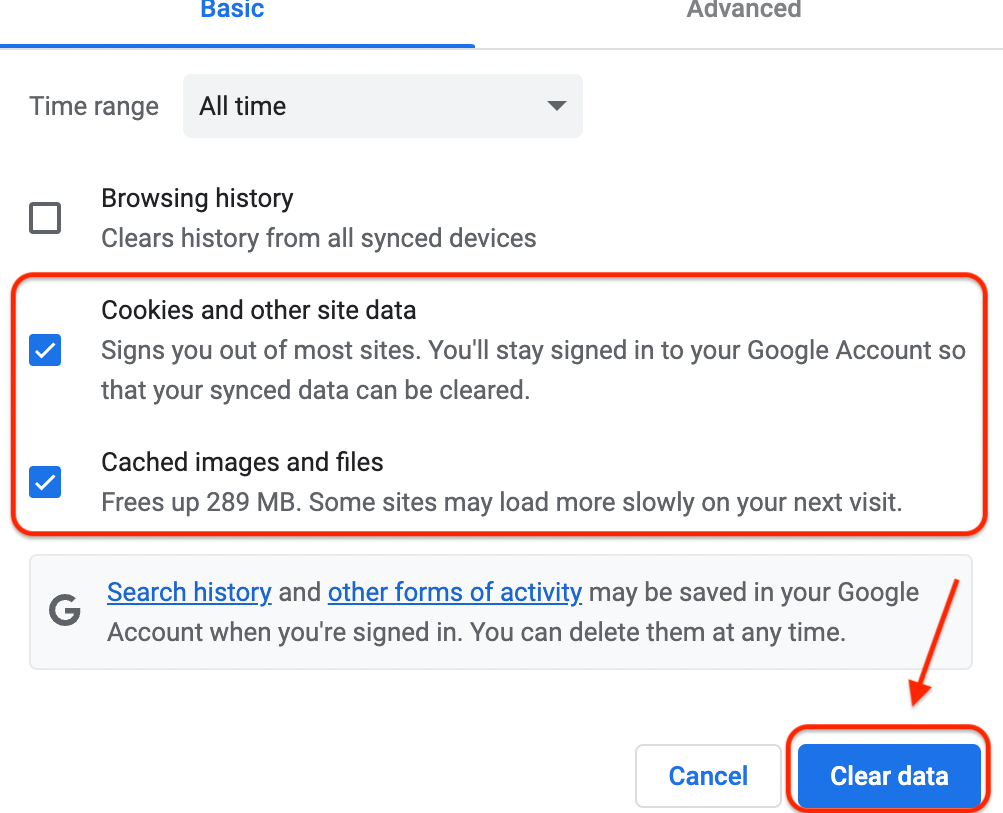
After you have cleared the outdated cache files, check whether you’re still getting the error DNS_PROBE_FINISHED_NXDOMAIN message. If the error message has disappeared, clearing the browser cache worked for you.
#3. Disable Your Firewall Or Antivirus
Disabling your firewall or antivirus can help determine if it is causing the error. If it is, whitelist the website, and turn on your antivirus again.
Antivirus programs provide easy-to-follow guides on how to disable them temporarily. Here’s a screenshot from McAfee’s website, showing you how to turn off their real-time scanning feature:
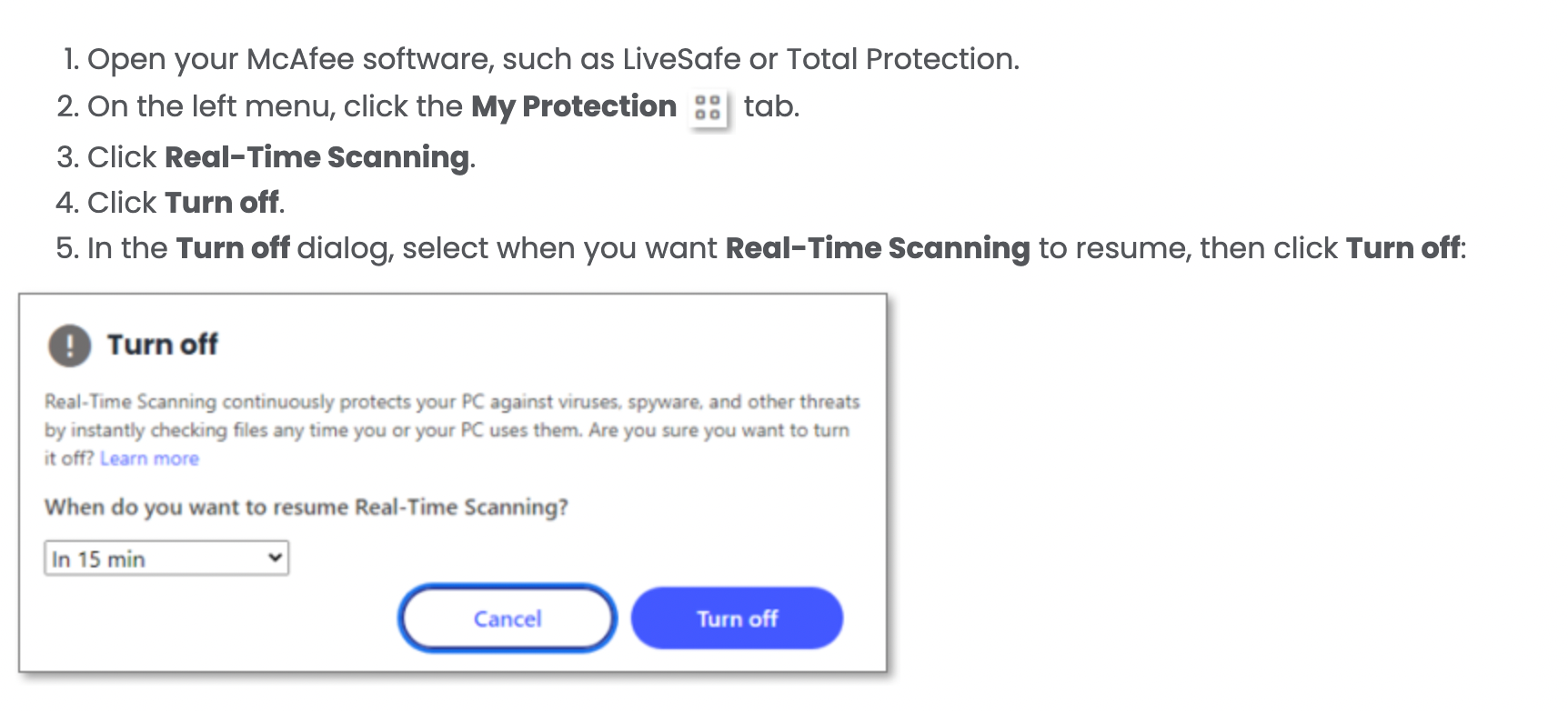
Note: Temporarily disabling your antivirus and firewall settings might resolve the issue. However, there are better long-term solutions than this, as your Antivirus program and firewalls protect your device from malicious attacks.
If the error message disappears, try adding these websites to a safe-to-browse list in your antivirus software.
#4. Flush Your DNS Cache
Follow the step-by-step guides your operating system provides to flush your DNS cache.
For Windows users, open the Command Prompt. Next, type in “ipconfig/flushdns.”
For MAC users, follow the step-by-step instructions shared in the screenshot below by HubSpot to flush the DNS cache.
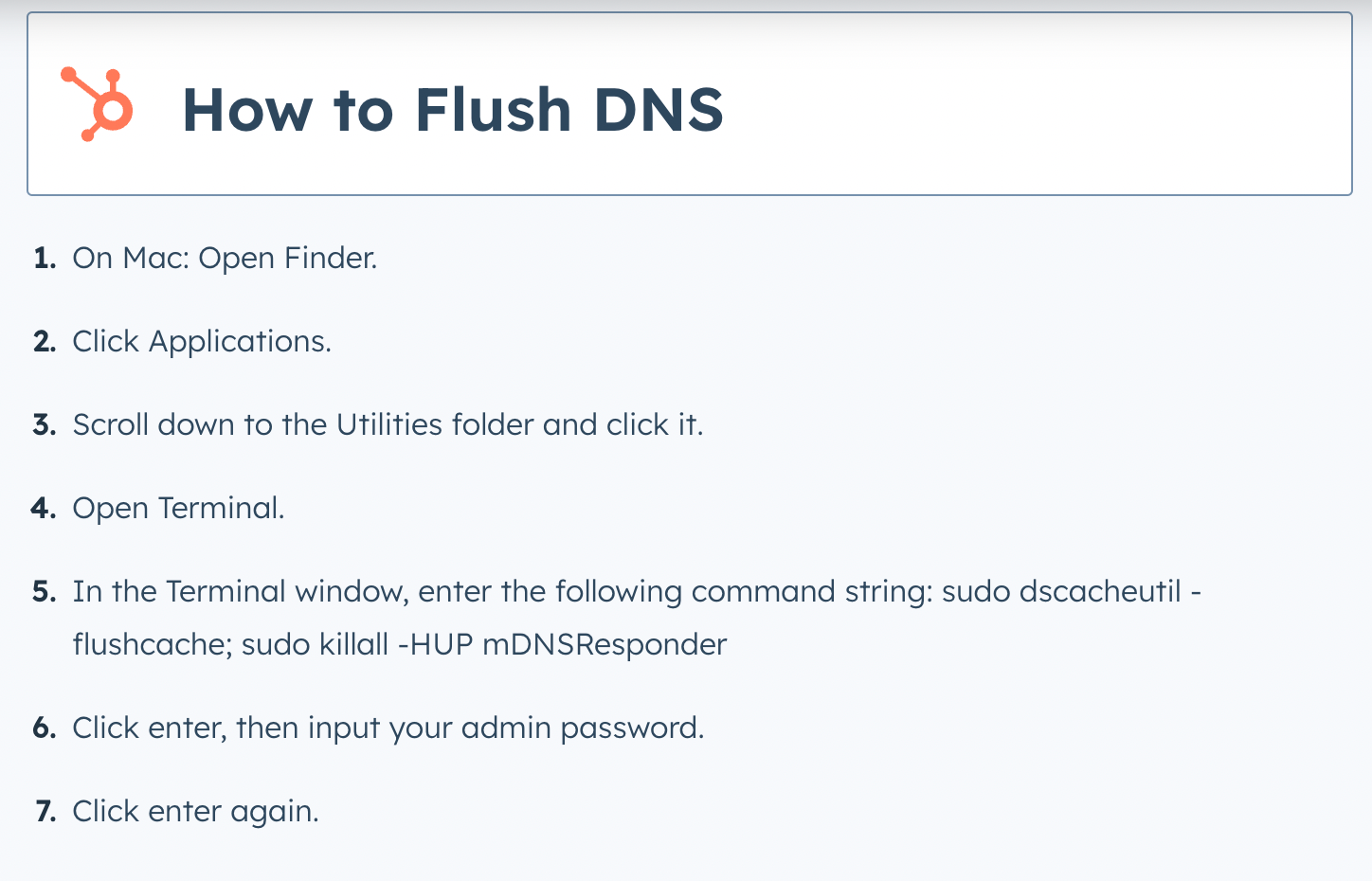
If the error message disappeared after you flushed the DNS cache, it means this was the cause behind the error message. If the error message persists, read on to try the solution below.
#5. Disable Chrome Extensions
Browser extensions sometimes cause issues and conflicts with your browsing experience.
You can try disabling your installed extensions to see if any extension is causing the DNS_PROBE_FINISHED_NXDOMAIN ERROR issue.
To disable extensions, go to the three vertical dots in the top right corner of your Chrome window. Next, click on “Settings” and select “Extensions”.
Next, turn off all extensions. Give it another try to access the website and see if the error still appears or has been fixed.

Note: If none of the above methods work, contact your ISP to see if there are issues. If there are issues, they will provide guidance, which may resolve the error.
Final Thoughts On DNS_PROBE_FINISHED_NXDOMAIN error
The dns_probe_finished_nxdomain error can be frustrating. Especially if you urgently need to access a website.
We hope this guide has provided you with all you need to know to fix the dns_probe_finished_nxdomain error.
The solutions outlined are simple and do not require much technical knowledge. Remember to try all the fixes mentioned above, such as flushing your DNS cache, and disabling browser extensions and antivirus software. They can help resolve the root cause of the dns_probe_finished_nxdomain error message.
If none work, try reaching out to the website admin you are trying to access and ask them to help you resolve the issue.
Check out this blog post if you want to fix the ERR_CONNECTION_RESET error message next.
Check Out Namehero For All Your Hosting Needs
While you’re here, check out our web hosting plans for your website or blog. We provide businesses worldwide with server hosting services at a fraction of the cost you might be currently paying!

Nirali has over a decade of experience working in marketing with startups in a variety of sectors, including e-commerce, ed-tech, and SaaS. She has a keen understanding of the unique challenges and opportunities facing early-stage companies and a track record of developing effective content strategies that drive growth and engagement.
Leave a Reply