
Ever have an email address that’s so old it eventually gets overrun with junk, and you just quit checking it?
I can’t tell you how many times this has happened to me over two decades of working online. I’ve legit gotten to the point where I’ll start a new email address and let the old one die out organically.
But with a company email, that’s not an option. When I first started NameHero in 2015, I set up a general catch-all address where I’d sign up for vendors, receive service notifications, and register for the countless tools we use along the way.
Fast forward to 2026 and that address became a nightmare. Sure, I had spam filters. But this email has been public in press releases, announcements, and social media posts for years. I’m pretty sure it’s in every email marketer’s database in the world lol.
So I’d gotten to the point of “what’s the use in checking it?” When I did check it, I was mass deleting thousands of emails at a time. Unless I knew I was looking for something specific, I considered the address a lost cause.
Being old school and stubborn, I never asked anyone for help. I’d tweak my spam filters here and there, put it off, and repeat. Then one day I needed to retrieve something important that went to that box. After hours of searching, it hit me: I’m the owner of a web hosting company. Surely we offer something better than what I’m doing.
In comes James Hart, one of our top managers: “Just enable our inbound mail filtering and it’ll instantly do everything for you.”
I heard him, and I knew the product worked. But I didn’t want to deal with DNS changes or risk an outage where everything started bouncing. So I put it off for a couple more days.
One morning I finally said, “James, if you set up the domain, I’ll add the DNS record and we’ll see how it goes. But if it breaks something, we’re reverting ASAP.”
A few minutes later: “Done.”
Done? What? Is it active?
“Yessir, enjoy.”
Since that day I haven’t worried about that email address once. I can go a week (or two) without checking it and it only gets the mail it’s supposed to get. Normal filters work again, the important stuff is easy to spot, and I spend a couple of minutes on it instead of hours.
Here’s the part that got me. We’ve offered this product for nearly three years, and I had no idea that 1) setup was this easy (legit one DNS modification) and 2) it works instantly with zero further configuration. No filters, no rules, nothing complicated.
Today I’m proud to announce this solution as HeroicGuard.
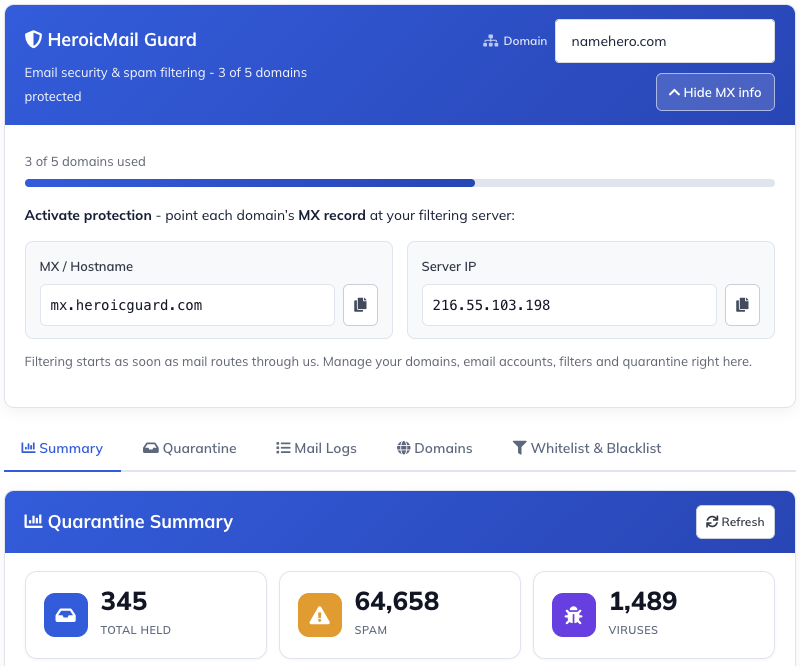
Protect every email account on your domain starting at $2.96/month. No cap on messages.
Before you ask, let me clear up some common questions
Ryan… seriously… spam filtering? It’s 2026.
Yeah, I know. I thought the same thing. This isn’t just a spam filter. I had PLENTY of those set up, and my inbox was still busting full. Seriously, over 1K+ junk emails a day.
Can I use this on a G Suite domain?
Yes, We use G Suite at NameHero for our company inboxes, but I wasn’t going to pay a monthly seat for a general contact box, so I had it bypassed to a local mail server. To implement HeroicGuard, I just changed that route. Took less than a minute.
Frequently asked questions about HeroicGuard
What is HeroicGuard?
HeroicGuard is NameHero’s email security and spam filtering service. It scans your inbound (and outbound) email in real time to stop spam, phishing, ransomware, and malware before they reach your inbox, no matter where your mailboxes are hosted.
How do I activate HeroicGuard?
Activation is a simple MX record change. After you order, you point your domain’s MX records to the HeroicGuard filtering servers shown in your Client Area. From that moment, all inbound mail is filtered and cleaned before being delivered on to your existing mailboxes. There is nothing to install.
Do I have to move my email to NameHero?
No. HeroicGuard sits in front of your existing email, whether that is HeroicMail, Google, Microsoft, or another provider. You keep your current mailboxes exactly where they are; HeroicGuard simply filters the traffic on its way in.
What does HeroicGuard protect against?
HeroicGuard blocks spam and bulk junk mail, phishing and impersonation attempts, malicious links, and email-borne malware including viruses and ransomware.
Which plan should I choose?
HeroicGuard comes in four packages: Sidekick, Hero, Legend, and MSP Reseller. Sidekick is ideal for individuals and small domains, Hero is our most popular plan for growing businesses, Legend delivers the highest level of protection for organizations that depend heavily on email, and MSP Reseller is built for resellers and managed service providers protecting many client domains. Compare the packages and pick the one that matches your needs.
What if I need help getting set up?
Our SuperHero support team is available 24/7, 365 days a year via phone, chat, and email to help you point your MX records and tune your filtering.
Get started with HeroicGuard

Ryan Gray is the founder and CEO of NameHero, one of the fastest growing independent web hosts in the United States. Ryan has been working online since 1998 and has over two-decades experience in Internet Entrepreneurship.
Leave a Reply